Professor: Samer Al-Kiswany | Term: Winter 2026
Lecture 1
Definition
A distributed system is a collection of independent computers that appear to the users of the system as a single computer.
Distributed software systems should provide easy-to-use abstractions, hide complexities, handle failures, efficiently use resources, and leverage emerging technologies.
Example
- A network of workstations allocated to users
- A pool of processors in the machine room allocated dynamically
- A single file system (all users access files with the same path name)
- User command executed in the best place (user workstation, a workstation belonging to someone else, or on an unassigned processor in the machine room)
Question
Why distributed?
- Economics: Microprocessors offer a better price/performance than mainframes
- Speed: A distributed system may have more total computing power than a mainframe
- Inherent distribution: Some applications involve spatially separated machines
- Reliability: If one machine crashes, the system as a whole can still survive
- Incremental Growth: Computing power can be added in small increments
Primary features
- Multiple computers
- Concurrent execution
- Independent operation and failures
- Communications
- Ability to communicate
- No tight synchronization (no global clock)
- “Virtual” computer
- Transparency
A bunch of computers that work together, but appear to be as one.
Challenges
- Heterogeneity
Distributed systems require communication and coordination across a variety of:
- Networks
- Hardware
- OS
- Programming Languages
- Implementations
- Scalability
Question
Can the system behave properly if the number of users and components increases?
- Scale-up: Increase the number of “users” while keeping the system performance unaffected
- Speed-up: Improvement in the system performance as system resources are increased
Tradeoffs need to be made (i.e availability and consistency CS451)
Impediments:
- Centralized data
- A single file
- Centralized services
- A single server
- Centralized algorithms
- Algorithms that “know it all”
Scalability is not black and white, there are shades of scalability. Some things that cannot be done at scale.
- Failure handling
- Partial failures
- Can non-failed components continue operation?
- Can the failed components easily recover?
- Failure detection
- Failure masking
- Failure tolerance
- Recovery
- An important technique is replication. This is a hard problem.
- Concurrency
Multiple clients sharing a resource how do you maintain integrity of the resource and proper operation (without interference) of these clients?
Managing failures in concurrent systems is difficult.
- Transparency
Transparency is not easy to maintain. There are many types of transparency:
| Transparency | Description |
|---|---|
| Access | Local and remove resources are accessed using identical operations |
| Location | Hide where an object is located |
| Relocation | Hide that an object may be moved to another location while in use |
| Migration | Hide that an object may move to another location |
| Replication | Hide that an object is replicated |
| Concurrency | Hide that an object may be shared by sevreal independent users |
| Failure | Hide the failure and recovery of an object |
Aiming at full distribution transparency may be too much. There are communication latencies that cannot be hidden.
Completely hiding failures of networks and nodes is impossible. You cannot distinguish a slow computer from a failing one. You can never be sure a server performed an operation before a crash.
Full transparency will cost performance. Keeping replicas up-to-date with the master takes time.
- Security
Confidentiality: Information is disclosed only to authorized parties.
Integrity: Ensure that alterations to assets of a system can be made only in an authorized way.
Authentication: How do we verify the correctness of a claimed identity?
Authorization: Does an identified entity have proper access rights?
Developing distributed systems: Pitfalls
Many distributed systems are needlessly complex, caused by mistakes that required patching later on. Many false assumptions are made.
False assumptions include:
- The network is reliable
- The network is secure
- The topology does not change
- Bandwidth is infinite
- Heartbeats are a sufficient failure detector - Partial network failures. Your view of a cluster is not the holistic view. https://uwaterloo.ca/computer-science/news/cheriton-computer-scientists-create-nifty-solution-to-catastrophic-network-fault.
Lecture 2
I skipped this lecture, it was a CS456 crash course.
Lecture 3
Communication Middleware
A distributed system organized as middleware.
The middleware layer extends over multiple machines.
Communication Alternatives:
Raw message passing
- TCP/IP: Reliable byte stream
- UDP/IP: Unreliable, packet oriented, connectionless
Problem: Low level not easy to use.
OS Abstractions: Distributed Shared Memory
On a page fault, get the remote page.
- Pros: Easy to program
- Cons: High overhead, hard to handle failures
Remote Procedure Call RPC (Xerox RPC)
Main idea: Call remote procedures as if they are local ones. The key advantage is that it is general, easy to use, and efficient.
Uses the well-known procedure call semantics.
The caller makes a procedure call and then waits. If it is a local procedure call, then it is handled normally. If it is a remote procedure, then it is handled as a remote procedure call.
Caller semantics is blocked send (send the request, stop, wait for the result, continue after it arrives). Callee semantics is blocked receive to get the parameters and a non-blocked send at the end to transmit results.
RPC architecture
flowchart TD

a[Caller Procedure]
b[Caller Stub]
c[Comm]
d[Comm]
e[Callee stub]
f[Callee procedure]


subgraph Caller
	a --> b
	b --> c
	c --> b
	b --> a
end
c -- Call packet(s) ---> d
subgraph Callee
	d --> e
	e --> f
	f --> e
	e --> d
end
d -- Result packet(s) ---> c
Interface{
	// has enough information for compile time
	// checking, and generating proper calling sequence
	int func1(int arg)
	int func2(char * buffer, int size)
}// Client stub for func1
int func1(int arg) {
// Create req
// Pack fid, arg, etc.
// Send req
// Wait for reply
// Unpack results
// Return result
}// Server stub for func1
int func1 {
// Unpack request
// Find the requested server function
// Call the function with arg in the request
// Pack results
// Send results
}Question
How about for
func2?
Problems
- * buffer points into different address space (solution: copy/restore if needed)
- Can be input or output (solution: add an argument type (in | out | both)
- Complex data structures
Question
How does the client know where to send the RPC request?
Binding
Server side:
- Load the function in memory
- Populate export table (
fid,fname,call_backfunction). Each function is assigned a unique id (fid) every time the function is exported - Export interface
In a register, the server ip and function names supported is stored.
Client Side:
The client queries the registry to see who provides the function they want to call (fname).
The registry will respond with the appropriate server ip.
The client will then query the sever to get the binding info for the function.
The server will respond with the fname, fid, and the client stores this info in memory.
At runtime, the client already knows the server address and function id. The client sends the function id and arguments to the server. The server looks up the fid in the export table, runs the function, and sends back the result.
Runtime choices:
TCP/IP
- High overhead on server, many connections and state
- High latency (setting/closing connections)
UDP/IP
- Unreliable
Fault Tolerance
Lost Request
When the function is called, client sends the fid and arguments to the server. Request was lost in the network on transit.
The client waits, times out, and the client retries. Request hits the server and returns the result back to the client. Retrying was safe because the function ran once.
Lost Reply
Client sends the fid and arguments to the server. Server receives the payload, runs the function, and sends the result back to the client. The reply back to the client is lost.
Client times out retries sending the function id and arguments to the server. The server runs the function and returns the result back to the client.
Problem
The function was executed twice.
Call Semantics
At least once: the function is executed at least once.
At most once: the function is executed once or not at all.
Neither one is perfect: exactly-once is desired, but has high overhead.
Xerox RPC implements, at most once semantic: If success is returned exactly once: it is guaranteed that it was executed exactly once. On failure, then it was called at once.
A client issues one RPC at a time.
Xerox at most once semantics:
Key idea: Every RPC request is uniquely identifiable.
The client sends the client ip, process id, sequence number (strictly increasing number), fid, arguments. This tuple uniquely identifies this call.
Server receives this, checks export table, check previous calls table in memory, runs function, returns result.
The previous call table checks if it has seen this (client_ip, process_id, seq_num) tuple before.
We return the client ip, process id, sequence number and result.
Fault Tolerance: Lost Reply
Client calls function, sends client ip, process id, sequence number, fid, arguments.
Server runs the function, lost in transit on the way back to the client.
The client times out and sends the request again (same client ip, process id, sequence number, fid, arguments). The server checks the previous_calls table and notices that this is a duplicate. It returns an ACK.
Fault Tolerance: Server Crash
Client calls function, sends client ip, process id, sequence number, fid, arguments. Server runs function, updates previous calls table. Then a reboot happens, server does not send anything back.
Client times out and sends the exact same request again. The server checks the previous calls, but there’s nothing in it, so it runs the function again and sends the result back to the client.
Solution to this is to rebind on server restart with new fid.
Client calls function, sends client ip, process id, sequence number, fid, arguments. Server runs function (export table has fid = 5). Then reboot hits. Rebind functions with a different fid. So now the same function has a fid = 11 in the export table.
The client times out and sends the same request as before (with fid = 5). The fid doesn’t match, so the server responds with an error that there is no such function id.
Upon receiving this error, the client should query the registry again for the new bindings.
Fault Tolerance: Client failure with repeated sequence numbers
Client calls function, sends client ip, process id, sequence number (10), fid, arguments. Server checks previous call table, populates it with the client ip, process id and sequence number. It runs the function, and returns the result.
Reboot after the client receives this.
We then have a later call of a different function, client sends client ip, process id, sequence number (1), fid, arguments. Server checks previous calls table, notices it is a duplicate (since sequence numbers are meant to be strictly increasing), and returns ack (without executing the function!). The server doesn’t know if the client rebooted and started fresh or if it is a delayed duplicate packet.
The solution is to add clock-based conversation id, to every call. <conversation_id, seq #> is strictly increasing.
Lecture 4
File system is the Operating Systems interface to storage.
Virtual file system is an abstraction layer in the Unix kernel that acts as an interface for the file system. Provides an API for the file system.
Specific file systems are assigned subtrees.
Application wants to read some data. Send call to VFS, VFS gets data from the right local file system (based on path).
Application wants to write some data. Send call to VFS, writes to file system, file system returns with success, though data isn’t written to disk.
fsyncis a blocking call that writes the data disk.
We don’t write to disk every time for performance reasons, must invoke fsync.
Hash table and Data table (Hash table stores pointer to the data in Data table).
If we want to update a key, we perform:
write(ptr) then write(data). This is risky if we crash.
So we can do
write(data)
write(ptr)
fsync(data)
fsync(ptr)
This is still not the right way to do it. There is no guarantee of ordering.
Correct ordering is
write(data)
fsync(data)
write(ptr)
fsync(ptr)
No guarantee of ordering for performance reasons. i.e. head is over a location on disk but the write operation for that location is not until later. We can reorder the operations to optimize speed.
Distributed file system emulates non-distributed file system behaviour on a physically distributed set of files, usually within an intranet.
We require transparency, concurrent access, file replication, and security.
Sun Network File System
On client computer, virtual file system goes remote to NFS client, NFS client uses NFS protocol to contact NFS server on server computer (uses RPC). NFS server sits in the UNIX kernel (not necessarily, just optimization), sends request to VFS, VFS gets data from UNIX file system.
flowchart TD
a[VFS]
b[NFS client]
c[NFS server]
d[VFS]
e[UNIX file system]
f[Application Program]
g[Unix file system]

subgraph Client computer
f -- UNIX system calls --> a
subgraph UNIX kernel
a --> b
a --> g
end
g --> ida[(Disk)]
end
b -- NFS Protocol ---> c
subgraph Server Computer
subgraph UNIX kernel
c --> d
d --> e
end
e --> id[(Disk)]
end
NFS V.3 Design Principles
- Access transparency: No distinction between local and remote files.
- Stateless design: Server does not maintain any state about clients. Easier implementation and easier to handle crashes. File operations are idempotent simplifies fault tolerance and implementation.
All NFS operations take a file handle.
Idempotent Example
Client wants to write to a file, performs:
fd = open(path)
write(fd, buf, size)
Server will write to file, send ack
Question
What if ack is lost?
Client will timeout, will run the same write again and send to server write(fd, buf, size)
Server will write again, send ack.
Error
This is not idempotent.
We include an offset in write(fd, buf, size, offset). Now this is idempotent.
Sketchy idempotence
Client wants to unlink file1.
Server unlinks the file, returns an ack. Ack is lost in transport.
Client times out and sends unlink file1 back to server.
Server is going to return an error since the file doesn’t exist anymore.
We account for this in NFS client side design. If we delete a file and it returns an error, then we have successfully deleted it.
File handler uniquely identifies file on the server side.
flowchart TD
a[VFS]
b[NFS server]
c[FS1]
d[FS2]

a --> b
a --> c[(FS1)]
a --> d[(FS2)]
We use i-node to uniquely identify files and to determine which file system has our files.
Warning
Client 1 writes to file with an inode 10. Server performs this action.
Client 2 unlinks file with inode 10 (delete). Client 2 creates a new file an i-node is generated to be assigned to the file. i-nodes are reused, this new file can be assigned i-node 10.
Client 1 writes to inode 10 (thinking it is the own file), but it is corrupting the new file.
To solve this we store an additional parameter, the i-node generation number. Store the i-node.i-node generation number in the function call.
It would first be i-node.0 from Client 1, and when Client 2 creates the new file and the i-node is the same, it would be i-node.1. When Client 1 tries to write to i-node.0, the server will respond with an error, the file doesn’t exist anymore. This solution is necessary since there exist a limited amount of i-node values.
To get the file handle of the root directory on a remote server, we use mount.
Client requests for mount path, server checks if path is exported, checks user permissions, returns file handle of exported root directory.
Lookup:
NFS does lookup iteratively one step at a time .
Client sends lookup for (people_fh, "bob")
Server responds with bob_fh
Client sends lookup for (bob_fh, "hw")
Server responds with hw_fh
Client sends lookup for (hw_fh, "a3")
Server responds with a3_fh
This is slow. Recursive would be faster but it is not implemented for the following reason.
Nested Mounting
Server A imports a directory from Server B
Client imports directory from Server A. It wants that directory from Server B.
Client sends request to Server A for the fh that is from Server B. Server A realizes it is from Server B, requests it, receives it, and sends it to Client.
This is dangerous. Server B may not want the client to access the directory, but when Server A is requesting the directory on behalf of the Client, Server B does not know this. The client should request to Server B itself.
The client needs to explicitly import subdirectory from server B.
To support all of this we need to do iterative lookup (recursive won’t work). We can still optimize by chopping into segments.
Read operation: Client sends read request for file handle. Server performs read and returns data blocks.
Write operation: Client writes to file handle. Server does persistent write back ack to client. Write through caching.
NFS requests transmitted via Remote Procedure Calls (RPCs). Client sends authentication information, checked against access permission in file attributes.
Any client may address RPC requests to server providing another client’s identification information. Introduction of security mechanisms in NFS v4.
Semantics of File Sharing
On a single processor, when a read follows a write, the value returned by the read is the value just written. In a distributed system with caching, obsolete values may be returned.
| Method | Comment |
|---|---|
| UNIX semantics | Each operation on a file is instantly visible to all processes |
| Session semantics (NFS) | No changes are visible to other processes until the file is closed |
| Immutable files | No updates are possible |
| Transaction | All changes occur atomically |
Lecture 5
WatDFS Project
Create a client module that acts as local file system, hook it to VFS, and have it issue commands to the remote server.
The client module does not need to be in the kernel space. We use FUSE. FUSE helps build a file system without writing kernel code.
Hook FUSE Kernel module to client module via libfuse. FUSE Kernel module will take system calls, send the calls to the user space client module, which the user will ship to the module. Server module executes the operations, computes result, and sends it back to the client module.
Requests from the client to the server are via a custom RPC library.
Components for each call
libfusehandler (handle from FUSE kernel module in kernel space to user space)- RPC calls
- RPC listener on the server in user space
- Request handler on the server in user space
flowchart TD
f[Applications]
g[Virtual File System]
h[Fuse Kernel Module]
i[libfuse]
a[libfuse handler]
b[RPC calls]
c[RPC listener]
d[Request handler]
e[Virtual File System]

subgraph client
	subgraph user space
		f
		i
		i --> a
		a --> b
	end
	f --> g
	h --> i
	subgraph kernel
		g
		g --> h
	end
end

b --> c

subgraph server
	subgraph user space
		c --> d
	end
	d--> e
	subgraph kernel
		e
	end
end
Implementation walkthrough of getting file attributes (for request handler)
int watdf_cli_getattr(void *userdata, const char *path, struct stat *statbuf);

int stat(const char *pathname, struct stat *statbuf);
Part 2: Setting up a RPC Call
// GET FILE ATTRIBUTES (need to apply this for all system calls)
int watdf_cli_getattr(void *userdata, const char *path, struct stat *statbuf) {
	// Set up the RPC call

	int ARG_COUNT = 3;

	// Allocate space for the output arugments
	void **args = new void*[ARG_COUNT];

	// Allocate the space for arg types
	int arg_types[ARG_COUNT + 1];

	int pahtlen = strlen(path) + 1 // +1 for null terminator

	// Fill in the arugments
	// The first argument is the path
	arg_types[0] = (1 << ARG_INPUT) | (1 << ARG_ARRAY) |
				(ARG_CHAR << 16u) | pathlen;

	// The first 3 bits of the first byte tell us whether the argument is an input, needs to be returned as an output, and whether the argument is an array, respectively. The last 2 bytes are the length of the array.
	args[0] = (void *)path;

	// The second argiment is the stat structure
	arg_types[1] = (1 << ARG_OUTPUT) | (1 << ARG_ARRAY) |
				(ARG_CHAR << 16) | sizeof(struct stat); // statbuf

	// The third argument is the return code
	// TODO: Fill in this argument type and argument

	// Finally, the last position of the arg type is 0
	arg_types[3] = 0;


	// Making the RPC call

	int rpc_ret = rpcCall((char *)"getattr", arg_types, args);

	// Handle the return

}
If the size is larger than the limit (), then we have to write in multiple RPC calls.
Part 3: WatDFS Server: Setup RPC call
int main(int argc, char *argv[]) {
	// Set up arguments
	int argTypes[4];

	// First is the path
	argTypes[0] = (1 << ARG_INPUT) | (1 << ARG_ARRAY) |
	(ARG_CHAR << 16) | 1;

	argTypes[1] = (1 << ARG_OUTPUT) | (1 << ARG_ARRAY) |
	(ARG_CHAR << 16) | 1;
	// Retcode
	argTypes[2] = (1 << ARG_OUTPUT) | (ARG_INT << 16);
	// Fill in the null terminator
	argTypes[3] = 0;

	// Register funciton
	ret = rpcRegister((char*)"getattr", argTypes, watdfs_getattr);
	// hand over control to RPC library (rpcExecute)
}
Part 4: WatDFS Server: Define RPC function handler
int watdfs_getattr(int *argTypes, void **args) {
	// Get the arguments

	// The first argument is the path
	char *short_path = (char*) args[0];

	// The second arugment is the stat structure
	struct stat *statbuf = (struct stat*) args[1];

	// The third argument is the return code
	// which will be 0, or -errno
	int *ret = (int *)args[2];

	// Convert path name
	char *full_path = get_full_path(short_parth);

	// Initially we set the return code to be 0
	*ret = 0;

	// Make the stat system call
	// Remember to set *ret to -errno if there is an error

	// The RPC call should always succeed, so return 0
	return 0;
}
Need to repeat this 8 more times for Project 1.
Example
Path manipulation
Home is on client, rest is on server (mounted).
stat('/mnt/home/Bob/F.dat', SB)
watDFS_cli_getattrib('/Bob/F.dat', SB) (this is the path given).
full_path() takes the above path and converts it into the full path.
Caution
Most errors happen in passing the arguments between the client and server. Print arguments and argument types before calls.
Lecture 6
Optimizations
- Client-side cache: File pages, directories, and file attributes.
- Read-ahead: Read the next page in the file. Once the file is open for read, NFS client will not wait for a read call, it will start reading.
- Write-delay (behind): Cache the writes (client or server side), until the page is flushed from the cache.
- Commit protocol: Server delays writing to disk until client commit(s).
- Client sends a write to the server. VFS on server will store the write in memory, send ACK back. Client sends another write, adds to cache, server ACKs back. Client commits, writes from cache get flushed to disk on server, ACKs back.
Question
Why is this okay for app developers?
Similar protocol for writing locally. Must use fsync to commit.
Caching in server and client is indispensable to improve performance.
Server caching
- Disk caching as in non-network filed systems
- Write-through caching
- Store updated data in cache and written on disk before sending reply to client. Inefficient if writes are frequent
- Commit operation
- Stored only in cache memory
Client caching write operations. Mark modified cache page as ‘dirty’ and schedule page to be flushed to server. Flush happens when closing of file, or when sync is used.
The data cached in client may not be identical to the same data stored on the server.
Timestamp-based scheme used in polling server about freshness of a data object.
- : Time cache entry was last validated
- : Time when block was last modified at the server as recorded by client/server
- : Freshness interval
Freshness condition: at time
If , then entry is presumed to be valid. If not , then needs to be obtained by a getattr call. If , then entry presumed valid; update its to current time. Else obtain data from server and update .
Lookup: Instead of iterative lookup NFS v4 performs full path lookup. Support for callback features.
flowchart TD
a[Old file]
b[Local copy]
c[Updated file]
subgraph Client
	b
end
subgraph Server
	direction TB
	a
	c
end
a --Server delegates file--> b
b --Client sends return file--> c

Client --Client asks for file --> a
Server --Server recalls delegation--> b
Andrew File System (AFS)
Infrequently updated shared file and local user files will remain valid for long periods of time. Allocate large local disk cache. Key assumptions usually small files, reads are more common than writes, sequential access, most files are used by only one user, burstiness of file references.
Design decisions:
- Whole-file serving: Entire contents of directories and files transferred from server to client (there is no recall delegation)
- Whole-file caching: When file is transferred to client, it will be stored on that client’s local disk.
Implementation of System Calls
When a file is opened, check if we have a cached copy of the file. Check if there is a valid callback promise. We don’t need to talk to the server. If we don’t have the file, or there is no valid callback promise, we need to get a fresh copy of the file from the server (and we get a valid callback promise). Place the copy of the file in the local file system, opened by the UNIX kernel, treated like a local file.
When closing the file, we notify Venus that the file has been closed. If the local copy has been changed, send a copy to the Vice Server that is the custodian of the file. Replace the file contents and send a callback to all other clients holding callback promises on the file.
AFS is a server initiated protocol, keep a list of clients, server will tell clients when there is a change (can only happen after a client closes a file). As opposed to frequent polling in Sun NFS.
Dealing with failures: The client may have missed some callbacks. Venus sends cache validation request to the Vice server (contains the file modification timestamp). If timestamp is current, server sends valid and callback promise is reinstated with valid. If timestamp is not current, server sends cancelled.
Problem: Communication link failures. Callback must be renewed with above protocol before new open if a time has lapsed since file was cached or callback promise was last validated.
Last Write Wins: AFS does not control concurrent updates of files, this is left up to the application.
Back to Communication
- Remote Procedure Call (RPC)
- Remote Method Invocation (RMI) - object-oriented
- Message-Based Communication
If client and server are on different CPU / OS, they may represent memory differently. Need to translate.
Option 1: Device a canonical form for data types and require all senders to convert their internal representation to this form while marshalling. This can be inefficient if both processes use the same formats, there is unnecessary conversation at both ends.
Option 2: Sender uses its own native format and indicates in first byte of message which format is used. Receiver stub examines first byte to see what the client is. Everyone can convert from everyone else’s format.
Client locates the server via dynamic binding.
The client kernel cannot differentiate between a) request to server, receives, executes, crashes, no ACK and b) request to server, receives, crashes, no ACK.
3 schools of thought:
- Wait until the server reboots and try the operation again. At least once semantic
- Give up immediately and report back failure. At most once semantics
- Client gets no help, guarantees nothing. Easy to implement.
Google RPC (gRPC) uses TCP-IP, protobufs for marshaling, at-most-once semantics. Missed deadlines are handled by applications.
flowchart LR
a[Client App]
b[Server Application]

subgraph gRPC_Client_Library
a
end

subgraph gRPC_Server_Library
b
end
gRPC_Client_Library <--The wire--> gRPC_Server_Library
If failure in gRPC client library, then try again. If failure in gRPC server library (before a hit to the server application), then try again.
Set a deadline on any gRPC call made (otherwise if stuck at server, client will be waiting forever).
Lecture 7
Remote Object is capable of receiving RMIs.
Remote Object Reference is needed by an object performing an RFI. Refers to the server of RMI. Can be passed as a parameter or result.
Client machine has a proxy that marshals the request to the server. On the server side, skeleton receives request and invokes same methods at the object. Similar to RPC.
RMI is implemented via a request/reply protocol (blocking).
Remote Interface
public interface HelloInterface extends Remote{


	// Throws a RemoteException if the remote invocation fails
	public String say() throws RemoteException;
}
Remote Object
public class Hello extends UnicastRemoteObject implements HelloInterface {
	private String message;

	public Hello (String msg) throws RemoteException {
		message = msg;
	}

	public String say() throws RemoteException {
		return message;
	}
}
Server
public class HelloServer{

	public static void main (String [] args) {
		try {
			Naming.rebind ("SHello", new Hello ("Hello world!"));

			System.out.println("HelloServer is ready.");
		} catch (Exception e) {
			System.out.println("HelloServer failed : " + e);
		}
	}

}
Client
public class HelloClient {
	public static void main (String [] args) {
		try {
			HelloInterface hello = (HelloInterface)
			Naming.lookup("//server_URL/Shello");
			System.out.println(hello.say());
		} catch (Exception e) {
			System.out.println("HelloClient failed : " + e);
		}
	}
}
At most-once semantics: Invoker receives result, in which case they know the operation was executed exactly once. Or an exception is received informing that no result was received, in which case the operation was either performed once or not at all.
Remote Reference Module sits in the server and maps remote object id to a reference of a local object.
Parameter Passing
If the argument is a primitive type pass by value
Object implementing Remove interface pass by reference
Object implementing Serializable interface pass by copy out
Non serializable object exception is raised
Garbage collection in non-distributed systems:
Solutions:
- Reference counting
- Tracing based solutions (mark and sweep)
Add a visited flag. Start from the core set of objects, follow all references and flag them. We then look at the total list of objects, and garbage collect the ones that are not marked.
The problem with reference counting is maintaining a proper count in the presence of unreliable communication.
We can copy the reference and let the destination increment the counter. However P1 can delete its reference before P2 increments the counter.
We can first increment the counter, get the reference, and then delete the reference after. Problem is that the two processes are coupled.
Solution is reference listing.
The skeleton maintains a list of proxies.
Advantage: Adds and deletes are idempotent.
Drawback: List of proxies can grow large.
Caution
Client process could crash, never clearing a reference from a server.
Use timeouts.
Lease based approach: Skeleton promises to keep info only for limited time. (Created by David Cheriton).
Message-Based Communication
Lower-level interface to provide more flexibility. Two abstract primitives are used to implement these: send and receive.
Message-oriented middleware (MOM)
Producers broadcast to brokers, brokers announce to consumers. Produces can send task to broker, broker will send to consumer.
Synchronous: The sender is blocked until its message is stored in the local buffer at the broker.
Asynchronous: The sender continues immediately after executing a send. Message is stored in the local buffer at sending host.
Transient: Sender puts message on the net and if it cannot be delivered to the sender, it is lost.
Persistent: The message is stored in the communication system as long as it takes to deliver the message to the receiver.
Question
How does this abstraction differ from other communication middleware?
MOM systems enable:
- Space decoupling: Producers and consumers don’t know each other.
- Time decoupling: Producers and consumers asynchronously commnuicate with the MOM service.
- Flexibility: Allow providing reliability and delivery semantics.
- Separation of concerns and extensibility: Clients communicate through a simple API.
MOM Topologies
- Single broker
- Mesh
- Flexible
- Peer-to-Peer
Single Broker
Single node runs the MOM service. Hosts all topics, receives all message, serves all consumers.
Single point of failure. Mitigation is replication.
Limited scalability and performance: Mitigation is partitioned topics.
Ill suited for multiple data centre deployments.
Mesh
Brokers can send to other brokers.
Flexible
Support a combination of single broker and mesh topologies. Can build a graph that fits unique deployments.
Brokerless peer-to-peer
No central brokers. Producers locally run the MOM service.
A discovery service provides consumers with the address of producers of a topics of interest. Consumers need to subscribe to all producers contributing to the topic. There is no coordination between producers.
Lecture 8
Question
What is a data centre?
Costco without the sign.
Houses tens of thousands of servers, organized into racks. Switches are usually placed in the middle of the rack (for wiring purposes).
Many non computer science / computer engineering problems in data centres.
Cooling strategies:
- Cold aisle, hot aisle. Servers are faced to each other. Pump cold air into the front of the servers, hot air gets pushed out to the back.
- Put servers in liquid baths (they do this in MC)
The new M4 building will use servers to heat water, and use the water to heat the building.
Compute, storage, network are three main components of a compute cluster.
Design metrics are performance (requests per second), cost (requests per dollar), power (requests per Watt).
Compute Node Design
Option 1: SMP: Symmetric Multi-processor
Shared memory multiprocessor. Set of CPU each with its own cache, sharing the main memory over a single bus. Very efficient in communication between cores, high performance per node, expensive.
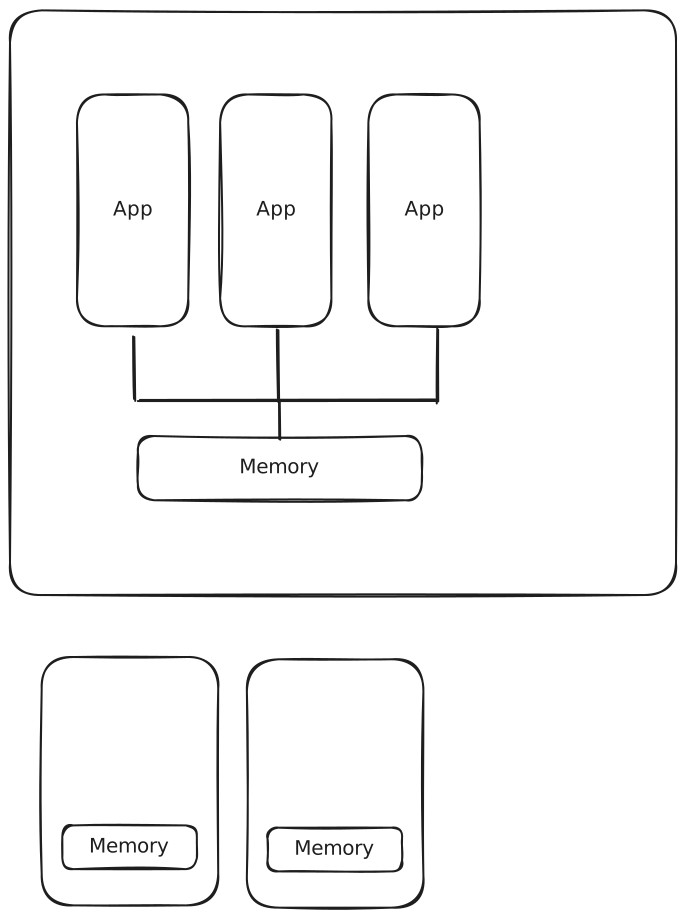
Option 2: Commodity Nodes
Purchase same number of cores with off the shelf components, use switches to connect them. Much lower cost, equal performance to SMP at scale, fails more often.
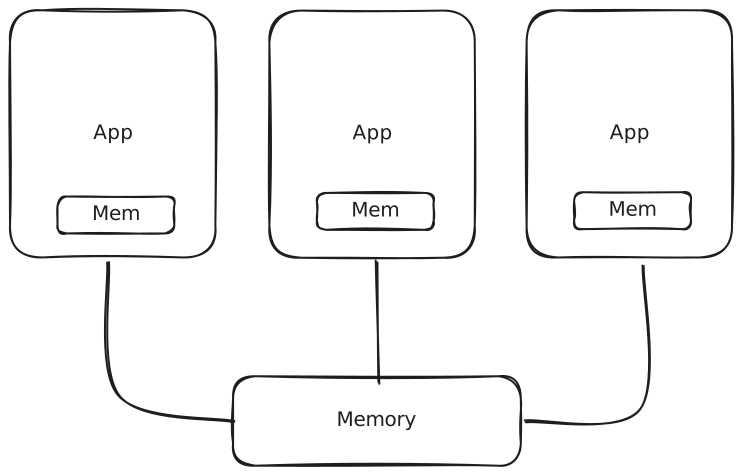 Execution time CPU time communication time
Assume local access takes 100ns, and remove access takes s.
Communication time # of operations [ ns s ()].
As cluster scales, benefits of local diminishes.
Option 3: Wimpy nodes
Using low end CPU (e.g. ARM processors). These are lower cost and lower energy, but hard to use effectively.
Design disadvantages:
Amdahl’s law bounds:
Task execution is ( is the ratio of code that can run in parallel).
After parallelization on cores: .
If , then second term goes to 0.
Speed-up . From the above, .
Lower utilization with wimpy nodes. Better parallelization, but worse sequential portion since hardware performance is worse. Good if the code is very parallelizable. Higher communication cost since more threads, harder to program, higher networking cost.
Storage Node Design
Option 1: Network attached storage (NAS)
Dedicated storage appliance. This has simpler deployment, control and management, lower network overhead.
Option 2: Distributed storage: Aggregate storage space from nodes in cluster.
Reduce cost by using cheap disks, will fail more but will replicate anyway.
Has lower cost, higher availability, higher performance, higher data locality. But comes with higher network overhead (network sees the data number of times it is replicated), lower component reliability.
Use NAS storage for long-term reliability. Use in-cluster storage for something that needs high performance access.
Network Design
Challenge: Build high speed, scalable network at lower cost.
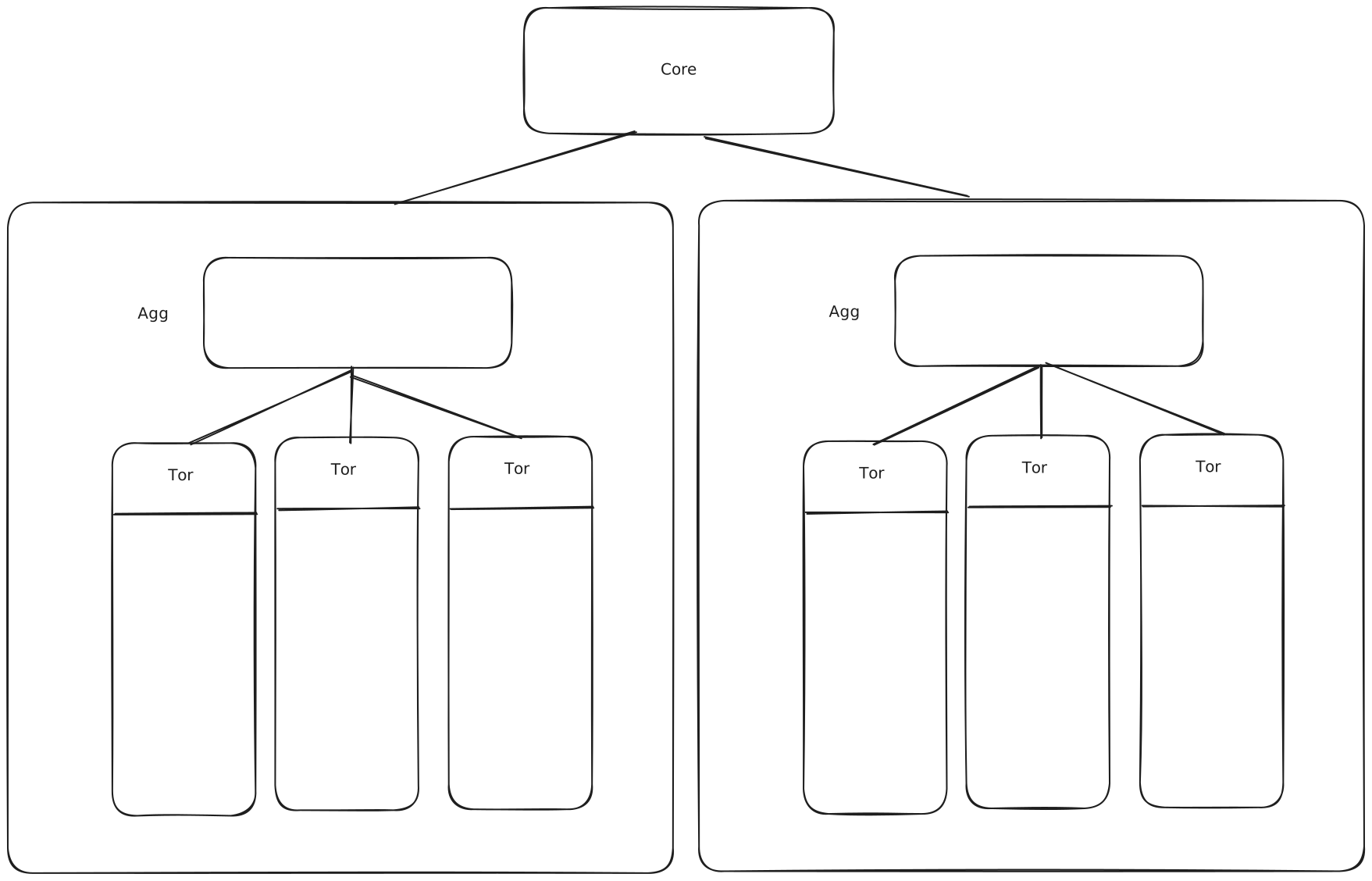
We don’t want link between TOR and Aggregation to be bottleneck. Needs to be able to support bandwidth of all servers sending their max size at once. Same goes for the core from the aggregations. At the core level, these are very expensive.
Optimization tricks:
- Reduce core bandwidth: 5:1 ratio is common
- Multiple networks (network for storage, control networks)
Data Centre Design Implications
Software using DC needs to be aware of the storage hierarchy. Software fault tolerance is necessary, server crashes happen every 30 minutes.
Lecture 9
Software using DC needs to be aware of the storage hierarchy.
Back of envelope math.
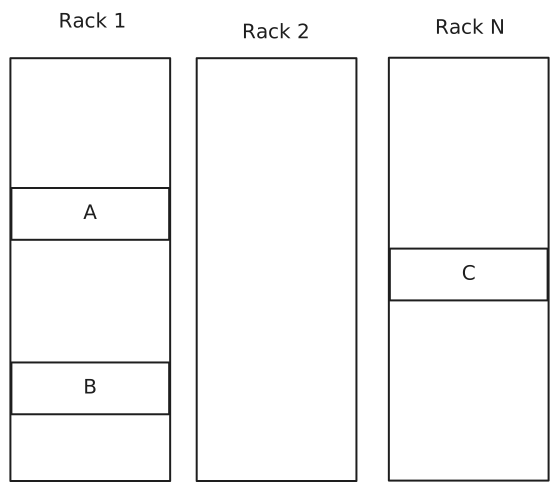
| Data location | Response Time | Throughput |
|---|---|---|
| RAM | 100ns | 20GBps |
| Hard Disk | 10ms | 80MPbs |
| Network-Rack | 70 s | 128 MBps (1Gbps) |
| Network-DC | 500 s | 32 MBps |
Response Time: How long does it take to get one item from the device
Throughput: Volume
| A RAM | A Disk | B Ram | B Disk | C Ram | C Disk | |
|---|---|---|---|---|---|---|
| Time | 1 100ns | 4 10ms | 2 70.1 s | 4 10ms | 3 500.1 s | 4 10ms |
| BW | 1 20 GBps | 3 80 MBps | 2 128 MBps | 3 80 MBps | 4 32 MBps | 4 32 MBps |
Special Cases: Pipeline vs Stop-and-Forward
flowchart LR
A -- 128 MBps --> B
B -- 128 MBps --> C
Question
How long does it take to transfer 1GB of data from ‘s memory to ‘s memory?
Stop-and-forward: waits to receive all data from before sending to .
Pipeline: As soon as gets data from , starts sending to .
Stop and forward, sending 1 GB from to
:
Combining gives .
Pipelined approach
flowchart LR
A -- 128 MBps --> B
B -- 128 MBps --> C
A -. 128 MBps .-> C
Throughput is slower of the two throughputs. Latency is
.
Bottleneck Link
flowchart LR
A -- 128 MBps --> B
B -- 64 MBps --> C
A -. 64 MBps .-> C
.
Concurrent Transfers
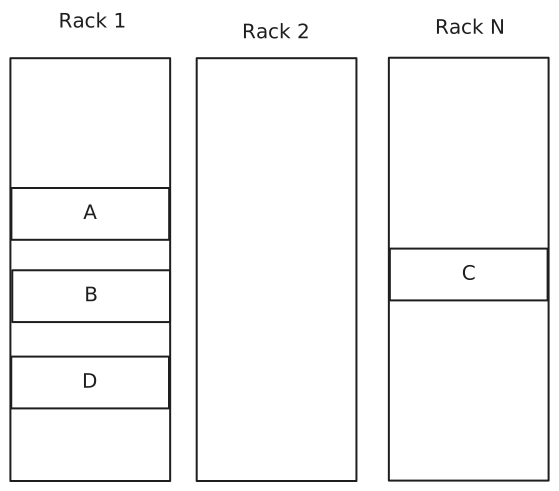
Question
How long does it take to transfer 1GB of data from memory to and memories, concurrently?
flowchart LR

Tor -- 128 MBps --> B
Tor -- 128 MBps --> D
A -. 64 MBps .-> Tor
A -- 128 MBps --> Tor
A -. 64 MBps.-> Tor
Tor -. 64 MBps.-> B
Tor -. 64 MBps.-> D
Contention is one input but two outputs. TCP is fair, splits the throughput.
Each one takes MBps.
.
.
Take the max, .
Question
How long does it take to replicate 1 GB of data from memory to and memories, concurrently?
flowchart LR
x[DC Net]

Tor -- 128 MBps --> B
Tor -- 32 MBps --> x
x --> C

A -.32 MBps.-> Tor
A -- 128 MBps --> Tor
A -.96 MBps.-> Tor
Tor -.96 MBps.-> B
Tor -.32 MBps.-> x
x -.32 MBps.-> C
TCP will try and split in half to Tor first, but DC Net can only take 32 MBps, so only gives it 32 MBps. The unused allocates this to link.
.
.
Take the max, .
How long to generate image results page (30 thumbnails)
Design 1: Read serially, thumbnail 256K images on the fly .
Design 2: Issue reads in parallel:
Architecture Models
System architectures define the structure of the system. Identify the components, define the functions, define relationships.
Styles: Organize into logically different components, and subsequently distribute those components over the various machines.
- Layered style (client server systems)
- Object-based style (service-oriented architectures)
System Architectures
- Client-server
- Multitier systems
- Peer-to-peer systems
Multiple-client/single server has problems. Server forms bottleneck, server is a single point of failure, system scaling is difficult.
Multiple clients/multiple servers has multiple approaches.
flowchart TB
a[Client]
b[Client]
c[Server]
d[Server]
e[Server]

subgraph Clients
direction TB
a
b
end
subgraph Service
direction TB
c --> d
d --> c
d --> e
e --> d
end
a --> c
c --> a
b --> e
e --> b
Alternatively, the initial server can invocate other servers.
flowchart LR
a[Client]
b[Client]
c[Server]
d[Server]
a
b
a --> c
c --> a
b --> c
c --> b
c --> d
d --> c
Lecture 10
Thank you to Kaushik for these lecture notes
Service Design
Client-Facing Services Performance Metrics
- Throughput: The number of requests that can be served
- Latency: How long does it take to serve an individual request? A short average latency is good, but tail latency is what’s critical
- Fairness: A single or few requests that are heavy cannot slow down other short requests
- Programmability: Ease of programming, debugging, maintenance
System Model
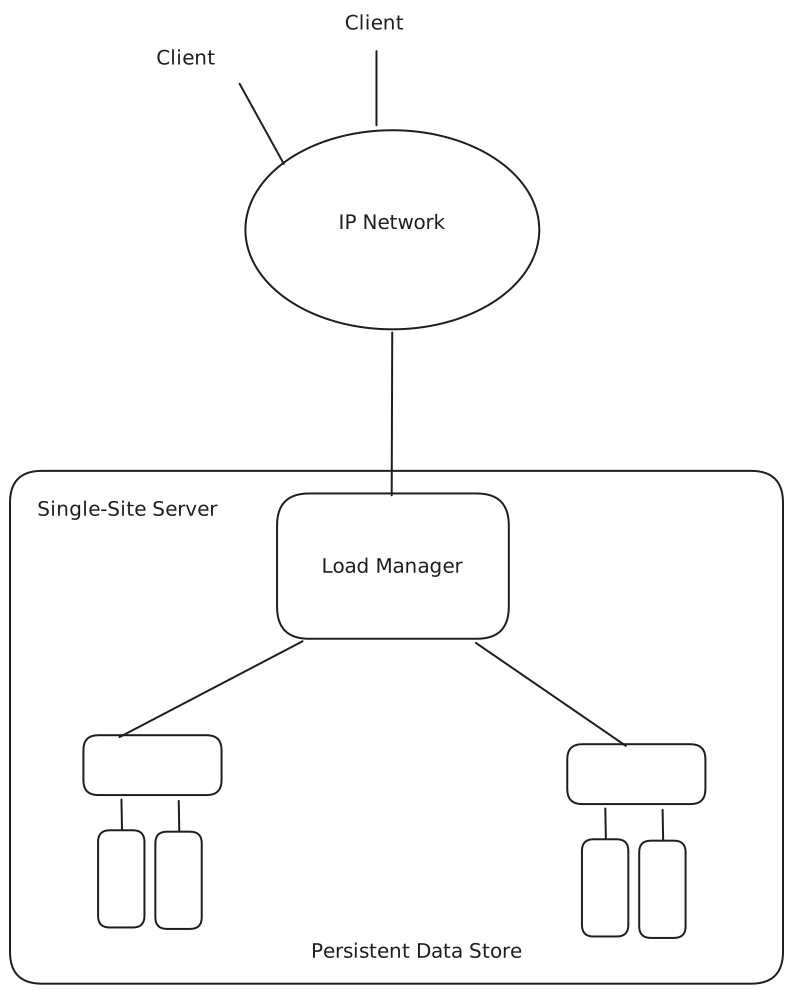
Load manager balances the load across the logic servers. Approaches
DNS-based: Go to DNS translation and route specific DNS addresses to different servers. Issues: can take hours to adapt and not available to small clusters.
Appliance or switch (L4). Balance at the TCP layer
Smart client (L7) (rarely used): Trusted client is exposed to the server architecture, clients randomly select a server that contains the services they wish to use.
Load Balancing Techniques:
Round robin: Only works for homogenous workload and platform. Can have weighted round robin for heterogenous platform.
Least number of connections: Monitor how many active requests per second send request to server with fewest connections.
Response time: Monitor how long it takes for a server to respond to a request pick server with the lowest response time.
Source IP hash: Remember which client is connected to which server by hashing the client IP, and the source port number.
SDN Based
Chained failover: Use server to max, then use more servers as necessary.
Server Designs
Single Process
Use a single process to handle all requests. Wait on a socket, receive and read a request from a socket, execute the request, return the result from the request. Even if there are cores on a machine, it will only use one core. Even the single core is not being used well, sitting idle for 50% of the time on I/O operations.
Caution
Blocking networking and disk operations.
Easy to program with low throughput and high latency.
Multi-Threaded
Make a multi-threaded application thread/request model.
When a request is received, create a new thread to process the new request, allow the thread to process the request, send the response back to the client, and finally kill that thread.
flowchart LR
z[network]
x[network]
a[Request 1]
b[Request 2]
c[Request 3]
d[Request 4]
e[Request N]

z --> dispatcher
dispatcher --dispatch--> a
dispatcher --dispatch--> b
dispatcher --dispatch--> c
dispatcher --dispatch--> d
dispatcher --dispatch--> e
a -- send result--> x
b -- send result--> x
c -- send result--> x
d -- send result--> x
e -- send result--> x
There is no queueing as requests are immediately placed on a thread for processing.
Maximum throughput when number of threads is equal to the number of cores on the machine. When threads exceed the cores available, the throughput will decrease; latency will eventually become exponential as no work is being done on requests.
Medium programmability with low throughput and high latency when under heavy load.
Multi-Process
Same architecture as a multi-thread design, except you fork a process for every new request.
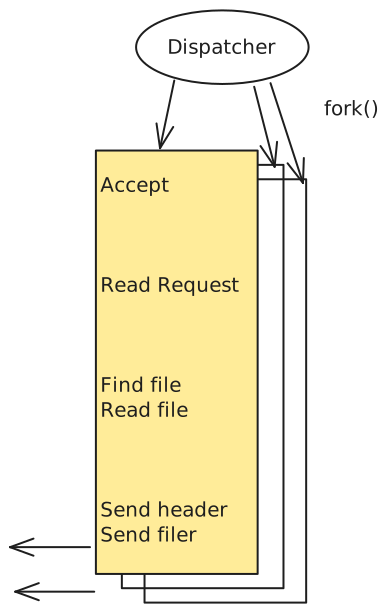
Heavy overhead (more than threading) but offers greater fault and security isolation since memory is not shared. Under a heavy load it has low throughput, high latency, and is unfair to short requests. Can combine multi-process with multithreading to balance performance and isolation.
Thread/Process Pool
Create and maintain a limited number of threads/processes to reduce overhead. Requests are continuously fetched from the queue, read and processed, and the result returned to the client. Fix the number of threads at the peak.
Programmability is medium with high config, but throughput is high and latency is medium. Difficult to find the ideal configuration of the number of threads. If service is CPU bound, then the number of threads = the number of CPU cores. The bottleneck may not be CPU, it may be I/O or disk, which means the peak is less than CPU cores. Sweet spot depends on the ratio of CPU to I/O.
Single Event Based Processing
Idea: I/O is the bottleneck, a single process is good enough for the compute part if the process does not block.
Have a primitive such as select() or poll()
Non-Blocking I/O
Divide processing such that the process running on the core never blocks on network I/O.
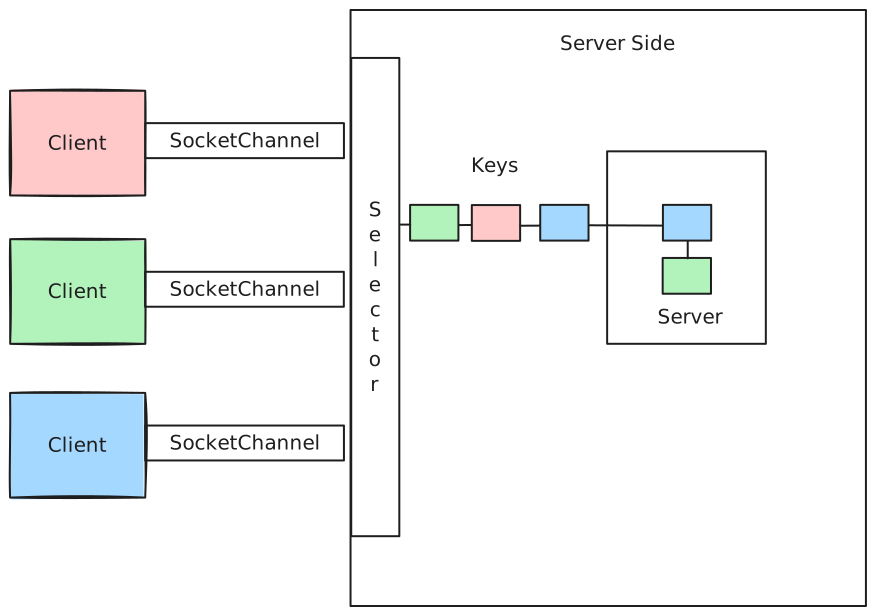
Server structure
while(True) {
	events_list = Select();
	Proecss(events);
}
Use Key.attachment to maintain state between events.
The server is only doing CPU stuff with the selector maintaining events in the buffer tasks are split between CPU and I/O. Isolated the waiting on the selector and the processing on the server selector performs the I/O so server receives only ready data.
If selector only has part of a request in the buffer, when it passes the packets to the CPU, they must be buffered until all of the request arrives. Create a state machine that must be maintained for each client.
This is very hard to program, with high throughput and low latency.
Debugging is incredibly difficult for thousands of state machines for thousands of clients all with various states.
Asymmetric Multi-Process Event Driven (AMPED)
AMPED is a single process-event based design with multiple helper threads for disk I/O.
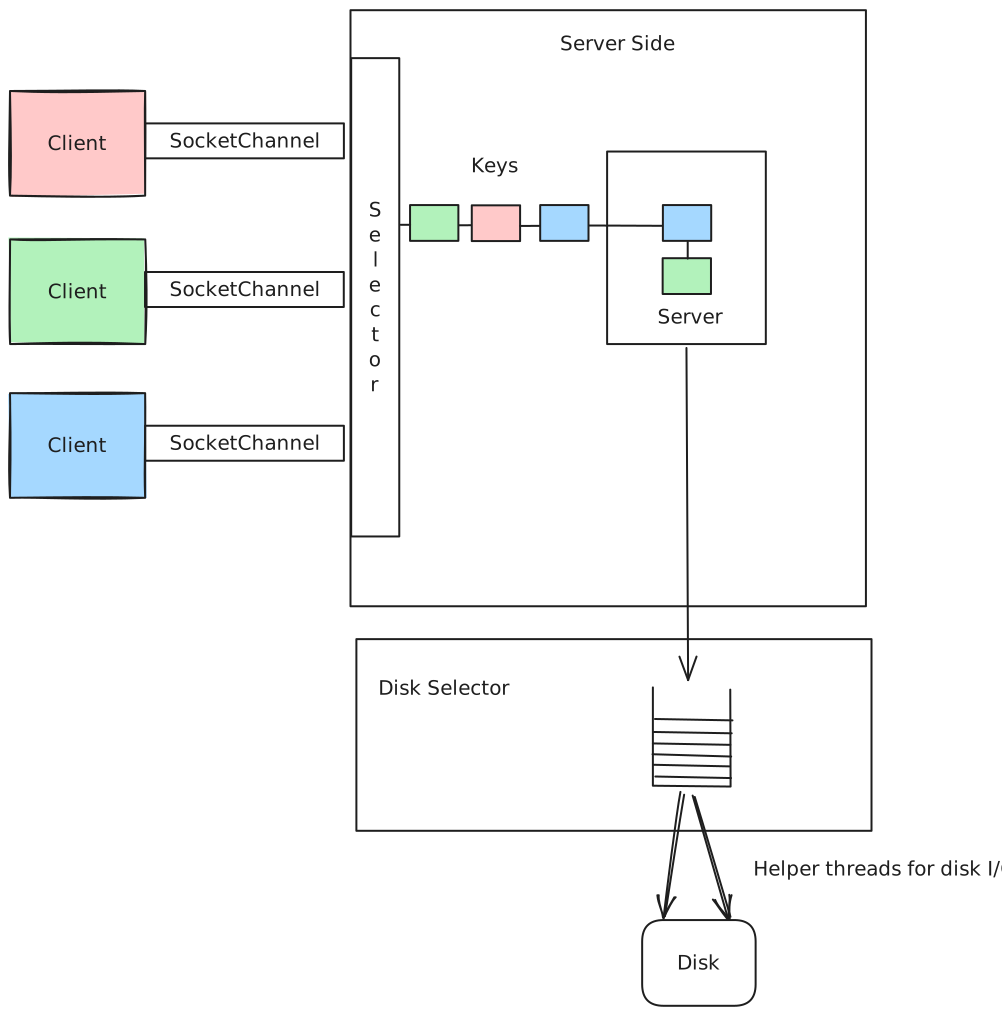
This enables us to completely separate compute from I/O. Very hard to program, but has high throughput and low latency.
Staged Event Driven Architecture (SEDA)
SEDA breaks the processing of the request into the CPU and I/O parts.
Well-Conditioned: Performance does not degrade with higher workload. Architect the application into stages that communicate only through queues.
flowchart LR
a[Accept Condition]
b[Read Packet]
c[Parse Packet]
d[Check Cache]
e[Handle Miss]
f[Send Response]
g[File I/O]
h[Write Packet]

subgraph SocketListen
	a
end
subgraph SocketRead
	b
end
a --> c
b --> c
subgraph HttpParse
	c
end
c --> d
subgraph PageCache
d
end
d --> e
d --> f
subgraph CacheMiss
e
end

subgraph HttpSend
f
end
e --> g
subgraph FileI/O
g
end
f --> h
subgraph SocketWrite
h
end
Each stage follows a thread pool design. Different controllers control number of threads, control batch size.
Looks into the application and divides it into stages based on which resources are being used. Role of a stage is to access exactly one resource pipeline of stages. Input to a stage is a queue that may output to multiple queues, only method of communication between stages.
Stages run handler to process task using a thread pool.
Benefits: Modular, easy to test and debug, automated performance tuning, fine granularity of control (per stage).
Good design since it abstracts complex generic parts letting programmer focus on application-specific parts.
| Throughput | Latency | Programming | |
|---|---|---|---|
| Single Proc | low | bad | easy |
| Multiproc | low | bad | medium |
| Multithread | low | bad | medium |
| Pool proc/thread | high | medium | medium |
| Event | high | good | hard |
| SEDA | high | good | medium |
Lecture 11
Design requirements for distributed systems:
- Performance
- Dependability
- Security
Performance metrics
- Response time
- Throughput
- System utilization
Dependability:
- Reliability: A system can run continuously without failure
- Availability: The probability that the system is operational at a given time .
If a system crashes for 1 ms every hour, the system is not reliable, but it is available.
Availability is measured via uptime.
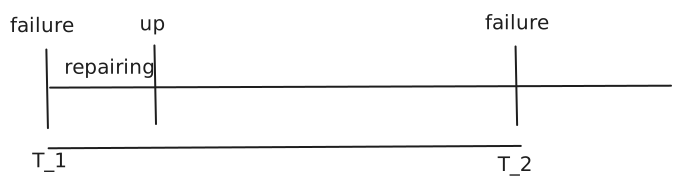 MTBF: Time between failures
MTTR: Repair time
MTTR MTTDetection MTT diagnose MTTFix
Failure Models
- Fail-stop/Fail-restart: The components stop working.
- Byzantine failure: Components are running but return corrupted data. Not implemented by default.
- Limping: The component is very slow.
Hardware Failure Rates
- Early Infant Mortality Failure: Servers fail young, but stabilize.
- Wear Out Failures: Doesn’t fail new, but breaks down over time.
- Bathtub Curve: Infant mortality, stabilizes, wears out.
Don’t replace clusters all at once to avoid early infant morality failure. Don’t buy all machines from one vendor.
Multiple ways to reduce uptime. Can increase MTBF, or we can reduce MTTR. If MTTR 0, then uptime is 100%.
Question
Which one is the better investment (increase MTBF or decrease MTTR)?
MTTR.
Design for fault tolerance:
- Decompose system into modules (limit shared state, OOP principles)
- Each module fail-fast (speeds up detection)
- Make module failure noticeable quickly
- Reduce configuration
- Redundancy in hardware, software, and data
- Use sessions or a transaction mechanism
Naming
Name services: Entries of the form <name, attributes>, where attributes are typically network addresses. Type of lookup queries: name attribute values.
Directory services: <name, attribute> entries. Type of lookup queries: name attribute values. Attribute values names.
Scalability: Naming directories tend to grow very fast
Consistency: Short and mid-term inconsistencies are tolerable. In the long term, system should converge towards a consistent state.
Flat names (i.e. MAC address) and hierarchical names (i.e. UNIX file system).
Domain Name System (DNS)
Performs name-to-IP mapping
Distributed database, implemented in hierarchy of many name servers.
Question
Why not centralize DNS?
Single point of failure, traffic volume, doesn’t scale.
How is it distributed? Global layer stores TLD, then keeps narrowing in scope as we go down.
Iterative vs Recursive (covered in CS456).
Communication cost comparison of iterative vs recursive depends on the distance from the client to the server, and from the servers to each other.
Server-controlled Hybrid Navigation
Non-recursive, server controlled: Server contacts peers if it cannot resolve name itself.
Recursive, server-controlled: If name cannot be resolved, server contacts superior responsible for a larger prefix of the name space. Recursively applied until name is resolved.
Makes sense to do iterative on the top levels, and at the lower levels we do recursive. This reduces load on servers (though long range communication for a few).
Lecture 12
Name & Directory Services
X.500
- ITU - standardized directory service
LDAP
- Directory service
- Lightweight implementation of X.500
- Often used in intranets
Synchronization
Synchronization problem: How processes cooperate and synchronize with one another in a distributed system. In single CPU systems, critical regions, mutual exclusion, and other synchronization problems are solved using methods such as semaphores. These don’t work in distributed systems because they rely on the existence of shared memory.
We will review clocks, election, mutual exclusion.
Clock synchronization
In a centralized system: Time is unambiguous. A process gets the time by issuing a system call to the kernel. If process gets the time and later process gets the time, the value gets is higher than (or possibly equal to) the value got.
Example: UNIX make examines the times at which all the source and object files were last modified.
- If time (
input.c) > time(input.o) then recompileinput.c. - If Time (
input.c) < time(input.o) then no compilation is needed.
In a distributed system: Achieving agreement on time is not trivial.
Computer on which compiler runes and computer on which editor runs may be different. The times are according to the local clocks and may not be synced.
Question
Is it possible to synchronize all the clocks in a distributed system?
A computer has a timer, not really a clock. Timer is precisely machined quartz crystal oscillating at a frequency that depends on how the crystal was cut and the amount of tension.
Two registers are associated with the crystal: counter (track this) and holding register (hard-coded). Oscillations decrement the counter by one. When the counter hits 0, generate a clock tick (interrupt) to the OS, and set the counter back to 60. OS has a translation from clock time to real time.
On each of computers, the crystals will run at slightly different frequencies, causing the software clocks gradually to get out of sync (clock skew). We try to modify the register value to account for the impurities in quartz, but this is still discrete so skew is inevitable.
Each machine timer causes an interrupt times a second. The interrupt adds 1 to the software clock. When UTC is , the value of the clock on machine is . In a perfect world, for all and all .
In practice, timers do not interrupt exactly times a second. The relative error obtainable with modern chips is .
Timer is said to be working within its specification if:
where constant is the maximum drift rate.
If after synchronization, 2 clocks are drifting from UTC in the opposite direction, they may be as much as at time .
For clocks not to differ by more than , they must be resynchronized every seconds.
Cristian’s Algorithm
One time server (WWV receiver); all other machines stay synchronized with the time server. Changes are introduced gradually by adding more or less seconds for each interrupt. The propagation time is included in the change.
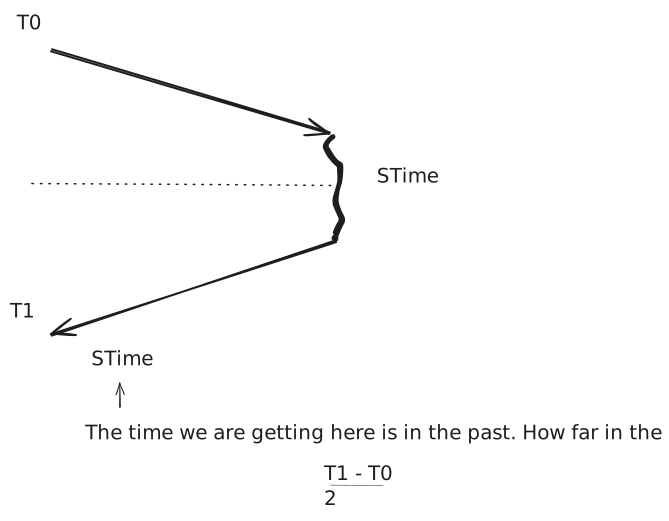
This is based on the assumption that the time is exactly in the middle, and the path taken is the same taken in both directions.
Network Time Protocol (NTP)
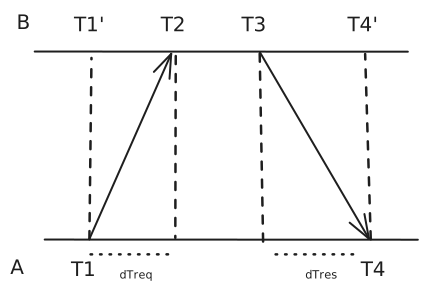
Offset between and = . Gradually adjust clock to minimize the offset.
This is assuming .
It is not safe to set a clock behind that was once ahead. Can result in negative runtimes which will break processes. Instead we slow the clock down (hardware clock ticks at same rate, but how conversion rate changes). Also not safe to set a clock ahead that was once behind. Same procedure to increase rate of clock.
With the invention of the atomic clock in 1948, it becomes possible to measure the time more accurately. Labs around the world have atomic clocks and each of them periodically tells the BIH in Paris how many times its clock ticked.
The BIH averages these to produce the TAI. Originally the atomic time is computed to make the atomic second qual to the mean solar second.
Since the mean solar day gets longer, the BIH made a necessary correction called UTC (universal coordinated time).
Berkeley Algorithm (for coordinating clocks internally, not caring about external times)
The time server (a time daemon) is active. Polls every machine periodically to ask what time is there. Based on the answers, computes an average time. Tells all other machines to advance their clocks to the new time or slow their clocks down until some specified reduction has been achieved.
The time daemon’s time is set manually by operator periodically.
Averaging Algorithm
Each machine broadcasts the current time according to its own clock. After a machine broadcasts its time, it starts a timer to collect all other broadcasts that arrive during some interval . When all broadcasts arrive, an algorithm is run to compute the new time from them.
Simplest algorithm: Average the values from all other machines.
Variations: Discard highest and lowest value and average the rest; add to each message an estimate of the propagation time from source.
For algorithms where clocks must not only be the same, but also must not deviate from real-time, we speak of physical clocks.
For algorithms where only internal consistency of clocks matters, we speak of logical clocks.
Logical Clock Synchronization
Happens-before relation:
If and are events in the same process, and happens-before , then is true.
If is the event of a message being sent by one process, and is the event of the same message being received by another process, then is also true.
If two events, and , happen in different processes that do not exchange messages, then is not true, but neither is . These events are said to be concurrent ().
Happens-before is transitive: and .
Lamport’s Algorithm
Capturing happens-before relation.
Each process has a local monotonically increasing counter, called its logical clock .
Each event that occurs at process is assigned a Lamport timestamp .
Rules:
- is incremented before event is issued at
- When sends message , it adds [this is event
send(m)]. - On receiving computes ; timestamp event
receive(m).
Lecture 13
Lamport Timestamps
Two data centres, one on east coast other on west coast. $1,000 in account.
Depositing $100 into east coast, and replicating on west coast.
Interest of 10% applied on west coast, replicate on east coast.
On east coast, $100 deposit may be registered first, and then interest is computed ($1,210).
On west coast, interest may be registered first, and then $100 deposit is added ($1,200).
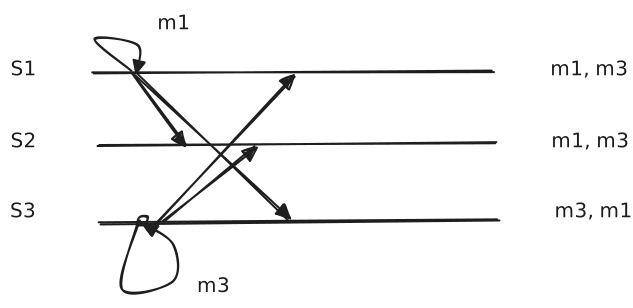
We want to define an order such that all replicas follow that same order.
Total-ordered multicast
To send a message, sender adds local logical time to the message. Broadcasts the message, waits for ACKs from all nodes.
For nodes, upon receiving a message, add message to queue order by time stamp in the message. Update the local logical time. Broadcast an ACK to all nodes. If the message at the head of the queue receives ACKs from all nodes, deliver the message to the application.
Assumes the network is reliable (no packet loss, no packet reordering, nodes do not fail).
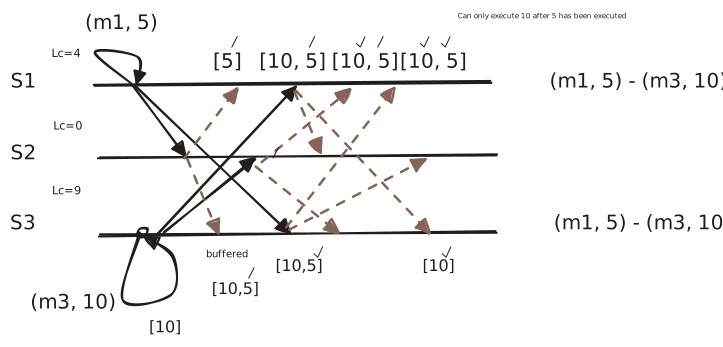
We buffer in since 5 isn’t in our queue yet (since we receive the ACK before the actual message). Once we receive 5 () from , we can instantly execute in .
To deal with the problem of multiple servers having the same logical clock time, we concatenate the IP to the logical clock to create a floating point number.
Question
In the concatenation, does the IP or logical clock come first?
Logical clock comes first. If IP was first, some servers with higher IP addresses will always be higher than others (and thus later).
Clients don’t participate in total-ordered multicast, servers do.
Vector clocks are constructed by letting each process maintain a vector with the following two properties.
- is the number of events that have occurred so far at . In other words is the local logical clock at process .
- If then knows that events have occurred at . It is this ‘s knowledge of the local time at .
Steps carried out accomplish property 2.
- Before executing an event executes .
- When process sends a message to , it sets ‘s (vector) timestamp () equal to after having executed the previous step.
- Upon the receipt of a message , process adjusts its own vector by setting for each , after which it executes the first step and delivers the message to the application.
Causal-ordered multicast
To send a message, the sender increments the vector clock only on message send events. Adds the local vector clock to the message, broadcasts the message.
For nodes, upon receiving a message from node :
- On node buffer the message until:
- (logical clock in the receive message = what you () think the senders logical clock is + 1)
- for all
Update the local clock on for the sender only .
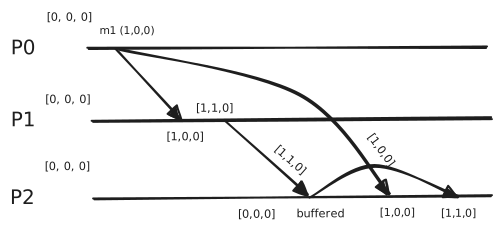
Difference between this and total ordering multicast.
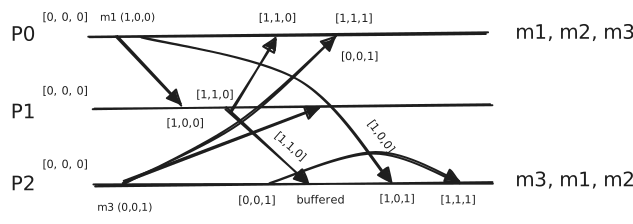
Lecture 14
Mutual Exclusion (CS350)
Requirements:
- At most one process may execute in the critical section (safety)
- Requests to enter and exit the critical section eventually succeed (liveness)
- If one request to enter the critical section happened-before another, then entry to the critical section is granted in that order.
- No starvation
A Centralized Algorithm (Central Server Algorithm)
One process is elected as the coordinator:
- Process 1 asks the coordinator for permission to enter a critical region. Permission is granted.
- Process 2 then asks permission to enter the same critical region. The coordinator does not reply.
- When process 1 exists the critical region, it tells the coordinator, which then replies to 2.
Advantages:
- Guarantees mutual exclusion, no starvation, fair, easy to implement.
Shortcomings:
- The coordinator is a single point of failure.
- If processes normally block after making a request, they cannot distinguish a dead coordinator from permission denied
# Messages before entering: 2 # Messages per entry/exit: 3
Distributed Algorithm
Process asks every other process for permission to go to the critical section. Once it has permission from everyone, it goes to the critical section. We break ties by logical clocks.
Upon receiving a request message from another process, if the receiver is not in the critical region and does not want to enter it, it sends back an OK message to the sender. If the receiver is already in the critical region, it does not reply, queues the request instead. If the receiver wants to enter the critical region (but has not yet done so), it compares the timestamp with the one contained in the message it has sent everyone. If the incoming message is lower, the receiver sends back an OK message; otherwise queues the request and sends nothing.
Problems:
The single point of failure has been replaced by points of failure; if any process crashes, it will fail to respond to requests. The silence will be incorrectly interpreted as denial of permission, blocking all subsequent attempts by all processes to enter all critical regions.
The probability of one of the processes failing is times as large as a single coordinator failing. If reliable multicasting is not available, each process must maintain the group membership list itself, including processes entering the group, leaving the group, and crashing. Slower, more complicated, more expensive, and less robust than the centralized algorithm.
# Messages before entering : # Message per entry/exit :
Token Ring Algorithm
Token holder may enter critical region or pass the token to the neighbour. Processes are connected in a ring (in-degree = out-degree = 1).
This guarantees mutual exclusion with no starvation (token circulates among processes in a well-defined order).
Problems:
If a process crashes while holding the token, we can generate another token to circulate for the other processes. But we must be completely sure that the process has crashed (this is hard), otherwise we run the risk of having two tokens present at once (two processes in the critical section at the same time).
We can solve this problem via leasing. Processes can only hold tokens for minutes, then must pass. If can’t pass the token (for whatever reason), drop it and generate a new token for the next process.
# Messages before entering: . # Messages per entry/exit: .
Election Problem
Many algorithms require 1 process to act as a coordinator.
Question
How do we elect a coordinator?
Assumptions:
- Each process has a unique number
- One process per machine
- Every process knows the process number for every other process
- Processes do not know which processes are currently up and which ones are currently down
Locate the process with the highest process number and designate it as the coordinator. Election algorithms differ in the way they do the location.
Bully Algorithm:
When a process notices that the coordinator is no longer responding to requests, it initiates an election:
- sends an
ELECTIONmessage to all processes with higher numbers - If no one responds, wins the election and becomes the coordinator
- If one of the higher-ups answers, it takes over. ’s job is done.
When a process gets an ELECTION message from one of its-lowered number colleagues:
- Receiver sends an OK message back to the sender to indicate that he is alive and will take over.
- Receiver holds an election, unless it is already holding one.
- Eventually, all processes give up but one, and that one is the new coordinator.
- New coordinator announce its victory by sending all processes a message telling them starting immediately it is the new coordinator.
If a process that was previously down comes back, it holds an election.
The biggest bully in town always wins.
Example
Nodes 0-7, 7 is the coordinator.
4 tries to communicate with 7, but 7 has crashed. 4 communicates with all nodes higher than itself for a new election. 5 and 6 ACK. 5 starts an election (sends to 6 and 7) and 6 does an election (sends to 7) concurrently. 6 ACKs to 5, 6 becomes the coordinator.
Ring Algorithm
Use a ring, no token is used.
When any process notices that coordinator is not function:
- Build an
ELECTIONmessage (containing its own process number) - Sends the message to its next alive successor
- Sender adds it sown process number to the list in the message at each step
When the message gets back to the process that started it all:
- Process recognizes the message containing its own process number
- Changes message type to
COORDINATOR. - Circulates message once again to inform everyone else. Who the new coordinator is and who the members of the new ring are.
- When a message has circulated once, it is removed.
This is not fair, but this is not mutual exclusion, this is leader election. It is okay for certain nodes to never become leaders.
Replication
Question
Why do we replicate?
Reliability & performance.
Question
Why not replicate?
Replication transparency & consistency issues.
Replica Placement Alternatives
Permanent replicas:
- Put a number of replicas at specific locations
- Mirroring
Server-initiated replicas:
- Server decides where and when to place replicas
- Push caches
Client-initiated replicas:
- Client caches
flowchart LR
f[Replica managers]
c[RM]
d[RM]
e[RM]
Client <--> Frontend <--> Service

subgraph Service
	c --- f
	d --- f
	e --- f
	f
end
Question
What to propagate?
Propagate only a notification. Propagate just the updated data. Propagate the updated operation, replica runs the logic itself.
On whether to propagate updated data or updated operation depends on tradeoffs between operation, compute, data etc.
Question
Who propagates?
Server: push approach Client: pull approach
| Issue | Push-based | Pull-based |
|---|---|---|
| State of server | List of client replicas and caches | None |
| Messages sent | Update | Poll and update |
| Response time at client | Immediate | Fetch-update time |
Replication Protocols
- Primary-based protocols
- Remote-write protocol
- Replicated write protocols
- Active replication
- Quorum-based protocols
Active Replication: Requires a process, for each replica, that can perform the update on it.
Problem of replicated invocations: If an object invokes another object , all replicas of will invoke . Client replicates invocation request (), receives the same invocation three times.
Two solutions:
- There is a coordinator of object that sends to
- There is a coordinator of object that points to all
Question
How do we reason about the consistency of the global state?
Data-centric consistency: Sequential consistency Data is always consistent.
Client-centric consistency: Eventual consistency Clients see a consistent view, and data is eventually consistent.
Sequential Consistency:
The result of execution should satisfy the following criteria. Read and write operations by all processes on the data store are executed in some sequential order. Operations of each individual process appear in this sequence in the order specified by its program.
These mean that all processes see the same interleaving of operations. The order between operations from Process is preserved. Interleaving between operations between different processes is arbitrary.
Lecture 15
Two-Phase Commit (2PC)
Phase 1: The coordinator gets the participants ready to commit their writes.
Phase 2: Everybody commits
- Coordinator: The process at the site where the transaction originates, and which controls the execution.
- Participant: The process at the other sites that participate in executing the transaction.
Global Commit Rule: The coordinator aborts a transaction if and only if at least one participant votes to abort it. The coordinator commits a transaction if and only if all of the participants vote to commit it.
Centralized 2PC
Client sends request. Coordinator asks all participants if they are ready. Either commit or abort. Coordinator sends decision back to participants, participants ACK back. ACK back to client.
Coordinator role:
- Maintain a copy of the database
- Coordinate the transaction commit
- Answer questions about old transactions
2PC State
Log 1
- Transaction id
- List of participants
- Transaction metadata
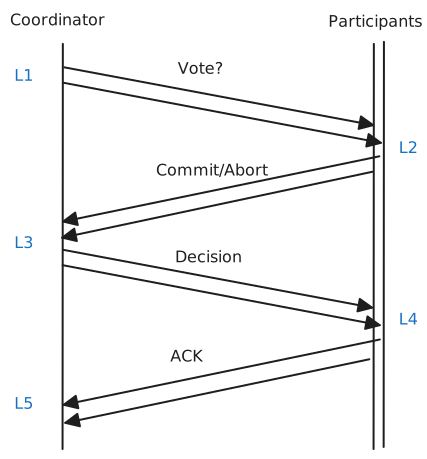
Log 2
- Log request and vote
- All participants lock the entry on disk in the database at this point (until we get the new decision)
Log 3
- Log decision
- After receiving all decisions, locks, changes value, then locks.
Log 4
- Commit to disk (operation is outside the scope of the protocol. i.e. do operation on some database).
- After performing the operation, we unlock. Anything locked has the old value, anything unlocked has the new value.
Log 5
- Clean up the log.
- We can clean up because no one will ask about it again. (since all participants ACKd)
2PC Failures
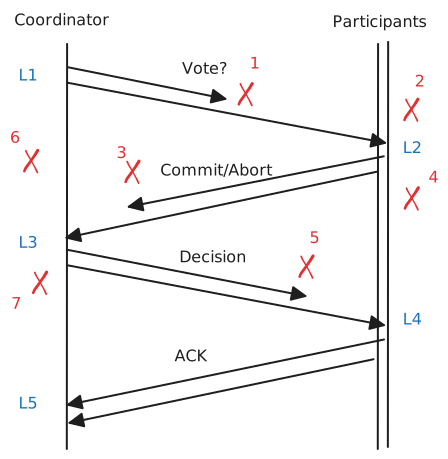
- Abort
- Abort
- Abort
- Coordinator decided to commit based on votes, a participant is not responding to the decision. We still commit, safe to ignore node and move forward. When it comes back alive, it checks L2 delta L4 to see what new state should be. If we locally aborted in L2, then can abort. If we committed, we can’t automatically commit (another participant may have aborted). In this case we need to check with the coordinator to get the results of the previous transaction (this can fail too, a separate failure).
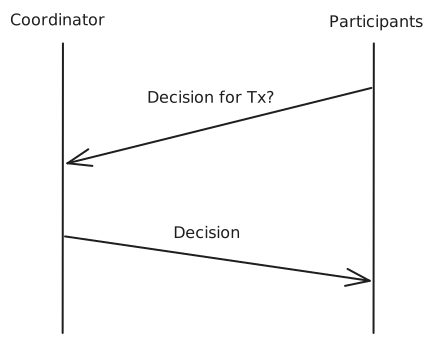
- Coordinator: Timeout. Keep retrying. If none succeed, don’t do anything. Once the participant sends its commit/abort decision, it starts a timer. If it doesn’t receive a decision soon enough, it will ask again.
- Send vote request to participants, participants agree and lock, coordinator crashes before it can receive the commit back. L3 is transactions that have reached a decision, L1 are transactions that started. Difference of L3 - L1 are transactions that started but are not done yet. We have enough information in L1 to retry, but instead we abort and let the client do it again.
- Upon restarting, coordinator checks the log, recovers, and answers queries about previous transactions.
- Modified: New coordinator never comes back alive, how do we unlock the data? Participants communicate with each other. If one of the participants received a decision from the coordinator before it dies, then all participants perform that action, a new leader is elected. If the coordinator did not send anyone a decision, participants speak among each other. If any of them aborted, they abort. What if all participants committed? Still have to abort. The coordinator could have voted to abort!
6 or 7: If there is permanent failure, this is blocking forever. If the coordinator fails after sending the first vote request before sending the decision, this is blocking.
2PC is vulnerable to blocking since it requires all participants to agree. We can modify 2PC to only require all alive participants to agree, and require the number of alive participants to be at least half of the total number of participants (Raft algorithm).
Question
What if a participant crashes?
There are no new transactions allowed.
Database recovery tool runs and makes sense of the logs. Manually resolves transactions, creates new participants, syncs database etc.
Lecture 16
Leslie Lamport created Paxos (was too confusing). So he then published Paxos Made Simple, Google then published Paxos Made Live, van Renesse then published Paxos Made Moderately Complex.
Raft was made to be more understandable and easier to implement than Paxos.
Servers store a log (sequentially consistent) of operations requested by the client. Consensus modules on each server communicate elements of the log. The log is replicated across servers. All servers execute same commands in same order. The consensus module ensures proper log replication. System makes progress as long as many majority of servers are up. The replicated log replicated state machine.
Raft uses a leader. Decomposes the problem, simplifies normal operation, more efficient than leader-less approaches.
Time is divided into terms. Every term starts with a leader election (bully based leader elections), and once a leader is elected, we start normal operations.
The term continues until the leader crashes. At most 1 leader per term, some terms have no leader (failed election).
Log Structure: Each entry stores the index, the term number, and the command. The log is stored on stable storage, survives crashes.
Entry is committed if known to be stored on a majority of servers. Once committed, it never changes.
Normal Operations:
Leader:
- Append to local log at index.
- Broadcast to all servers:
Append(index, item, cmd, prev_term).
Follower: 3. If logs match up until the index: write to log and ack.
Leader: 4. When responses received from majority commit. 5. Broadcast result to all servers.
Follower: 6. Commit.
Leader: 7. Reply to client.
Raft logs have three properties.
If log entries on different servers have the same index and term they store the same command (1) and the logs are identical in all preceding entries (2). This is because both logs must have been pushed by the same leader (a term can only have at most one leader). The leader creates at most one entry per index. Logs are identical in preceding terms via the property of the follower only writing to log if the logs match up until the index.
Each AppendEntries RPC contains index, term of entry preceding new ones. Follower must contain matching entry; otherwise it rejects request. Implements an induction step, ensures coherency.
For example the leader says: Add (3,jmp) at f_log[5] iff l_log[4] == f_log[4]. We don’t need to check the commands, just that at index , they were both from the same term.
(3) If a given entry is committed, all preceding entries are also committed.
Entry is committed if known to be stored on majority of alive + dead servers. So majority of servers need to be alive or else it halts.
The new leader must make follower logs consistent with its own. Delete extraneous entries, fill in missing entries.
Leader keeps nextIndex for each follower. Index of next log entry to send to that follower. Initialized to (1 + leader's last index).
When AppendEntries consistency check fails, decrement nextIndex and try again:
Multiple ways for followers to have inconsistent logs to the leader. If the server crashes after replicating some logs but not all, followers may crash, etc.
Servers start up as followers. Followers expect to receive RPCs from leaders or candidates. Leaders must send heartbeats to maintain authority.
If electionTimeout elapses with no RPCs:
- Follower assumes leader crashed
- Follower starts new election
- Timeouts typically 100-500ms
The term number will be incremented, the node will change to candidate state and will vote for itself. It will send RequestVote RPCs to all other servers, retry until either:
- Receive votes from majority of servers becomes leader, send
AppendEntriesheartbeats to all other servers. - Receive RPC from valid leader return to follower state
- No-one wins election increment term, start new election.
If and leader crashes, say nodes 2 and 5 start election process and vote for itself. Node 3 votes for 2, Node 4 votes for 5. Majority is , there is no winner. We increment the term and start the election again.
Question
How do we reduce the chance this happens again in the next term?
Selecting the higher node isn’t sufficient, the nodes may not all be communicating with each other.
Solution: Back-off
Nodes 2 and 5 select a random number , and sleep for that amount of time. Each node has two threads in an election, one for requests, and one to vote for itself. We ask the request thread to sleep for amount. Ideally one of the nodes finishes an election before the other’s request thread wakes up.
It is possible for votes to split again (if sleeps are close). If votes tie, double the sleep range. Keep increasing the range to increase the probability that one wakes up early enough to collect the votes and become a leader before the other wakes up. This is exponential backoff.
During the election, the system is not updating the logs. Logs are only updated during normal operations, not election times.
Safety: Allow at most one winner per term. (Don’t do something wrong).
Liveness: Some candidate must eventually win. (Do something right eventually).
Lecture 17
Committed entries should not be deleted, but the leader wants its followers to have its log, and will delete entries in other clients that are not in its log.
So we need to pick a leader that has all committed entries.
Candidates will not vote for other nodes that are in lower terms (since they are more up-to-date).
Candidates include log info in RequestVote RPCs (index & term of last log entry).
Voting server denies vote for candidate if its log is “more complete”:
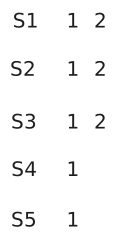
Server 4 and 5 can never become leaders.
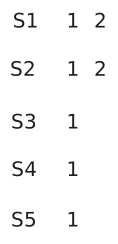
In this example, , , can become leaders.
They then remove the term 2 and add term 3. They can remove term 2 since they haven’t been committed yet (since not a majority).
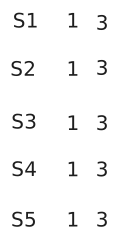
Wrinkle
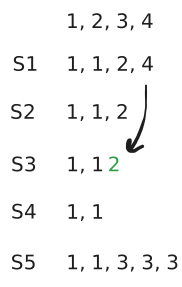
In order to write 4 from to , we need to write 2 in index 3.
After we add 2 to , crashes.
S5 VoteRequest:
- T = 3
- I = 5
votes for , votes for , votes for , votes for .
asks to remove the entries not in its own log. It removes entry in index 3 (term 2), and replaces it with 3.
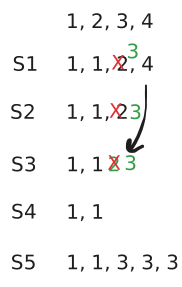
But we have deleted a committed entry (since majority have 2).
Solution: Replicate leader entries in the same operation when copying to a follower. So instead of just adding a 2 from to , we would add 2 and 4 at the same time.
Doesn’t fully solve the problem.
Instead, when the leader replicates, it just announces that its most up to date index is committed (not stuff before).
Client Protocol
Send commands to the leader. If the leader is unknown, contact any server. If contacted server is not the leader, it will redirect to the leader.
Leader does not respond until command has been logged, committed, and executed by leader’s state machine.
If request times out:
- Client reissues command to some other server
- Eventually redirected to new leader
- Retry request with new leader
To ensure commands are not ran multiple times, we store the IP, process, sequence number along with the command. We store a previous call table and check for duplicates before executing commands.
Configuration Changes
ID, address for each server. Determines what constitutes a majority.
Consensus mechanism must support changes in the configuration.
.
Admin communicates with all servers to update them of the modification. Assume a partition happens in the server during this update.
Assume the leader is , and the network is partitioned to and . We will end up having two leaders (problem).
Solution: Leader election needs to satisfy and .
Raft uses a 2-phase approach.
Intermediate phase uses joint consensus (need majority of both old and new configurations for elections). Configuration change is just a log entry.
Once joint consensus is committed, begin replicating log entry for final configuration. needs to be on majority of nodes (not necessarily all). It needs to be committed.
Lecture 18
Lookup is a core building block for many services. Classic hashing tables are not going to work since changing the number of nodes requires moving of data.
Consistent Hashing
Use a hash function to map keys and nodes to a single naming space. The hash space is circular.
Hash the IP value, and put it on the ring. Servers are responsible for the IP hash range before it.
Each node is assigned an -bit identifier. Every entity is assigned a unique -bit key. Entity with key falls under the jurisdiction of the node with the smallest (called its successor ).
Each node knows its own successor and predecessor nodes (important for determining successor for any given value).
Lookup (first attempt). Contact any node to find a key. Minimum information to know is the successor. Nodes forward request to its successor until the key successor is found. To find a node takes .
Lookup (optimization). is the number of bits of a node/key hash. The ring has values. Each node maintains a finger table of entries. Each entry in the table represents a node further from the node. Entry where .
Number of bits , number of hashes is .
Each node maintains a finger table with at most entries:
Finger Table for Node 9 (assume had some IP, hashed, resulted in 9)
| Finger | Node |
|---|---|
| 1 | |
| 2 | |
| 3 | |
| 4 | |
| 5 |
To look up a key , node forwards the request to node with index satisfying
If , the request is also forwarded to .
The max pointer is halfway across the ring. So if what we are looking for is the max possible distance, in our first finger table lookup, we eliminate half of the search space. Every jump halves the distance between the node and the target node. This takes , where is the number of nodes.
Ring reliability: Each node maintains a successor list of the next successors. Periodically run the stabilization function. Check the predecessor of your successor, make adjustments if necessary.
Node Join:
- Find your place in the ring (lookup your own id)
- Set your successor pointer
- Set your predecessor pointer
- Run stabilization function
- Slowly fill finger table
Only of the data needs to be copied.
Lecture 19
Eventual Consistency: Trades consistency for availability and performance. If no new updates are made to a given data item, eventually all access to that item will return the last updated value. Good for applications that can tolerate periods of inconsistent values.
Client-Centric Consistency is a more relaxed form of consistency. Only concerned with replicas being eventually consistent (eventual consistency).
In the absence of any further updates, all replicas converge to identical copies of each other. Only requires guarantees that updates will be propagated.
Easy if a user always access the same replica. Problematic if the user accesses different replicas. Client-centric consistency guarantees for a single client the consistency of access to a data store.
Monotonic Reads - If a process reads the value of a data item , any successive read operation on by that process will always return that same value or a more recent value.
Monotonic Writes - A write operation by a process on a data item is completed before any successive write operation on by the same process.
Read your writes - The effect of a write operation by a process on data item will always be seen by a successive read operation on by the same process.
Pure Eventual - A read operation of a variable can return any previous value of .
Key-value storage is a critical component in modern centres. Basic operations: Put(key, value) and value = Get(key).
Amazon Dynamo Goals
Build a key value store where failure is the norm, tail latency 99.9 percentile (99.9% latency below 400 ms for 500 requests per second). Scalability, support heterogeneous nodes, availability more important than consistency (always writable).
For the latency they wanted, the latency of chord () is not fast enough.
Solution one: One node contacts everyone. This is high overhead on that node to handle hundreds of TCP connections.
Dynamo Solution: Admin manually add/remove nodes permanently.
When a membership change happens (join or leave), contact a node and update its membership. Nodes use a gossip-based (epidemic) protocol to propagate membership after immediately updating its successor and predecessor. Pick a node at random (two nodes), exchange membership information. If we get extremely lucky and select two uncontacted new nodes every time, will take . The ring eventually converges.
The majority of nodes will get the new information.
Replication via quorums ()
(guarantees that reads and writes overlap).
(guarantees two writes overlap).
Example
WC Server (), EC Server (), EU Server () Client updates WC server to . Via Raft, all other servers attempt to update to . If there is a network partition and EU disconnects but the client wants to update EU to , it will not update since it can’t find a leader (no leader to accept the writes). With Dynamo, we will have for the first two servers, and for the EU server. This is inconsistent but available.
CAP Theorem (CS451): In the presence of a network partition, one must choose between sequential consistency and 100% availability.
Dynamo chose availability over consistency. This may lead to conflicts.
Question
When do we resolve them? At reads or writes?
Dynamo is always writable store, means conflict is resolved on read.
Question
Who resolves conflicts? Storage or application?
Application informed conflict resolution.
API:
<objects, contexts> = Get(key)
Returns all of the unresolved versions of the object.
Put(key, context, object) Context includes the object version.
If there are no updates, rewrite a new version of the object. Objects are immutable, each object is stored with context (vector clock).
Dynamo Put Operation:
- Coordinator receives put request
- Add vector clock
- Write to local storage
- Send to nodes
- If respond the write is successful
Vector clocks is a list of <node, seq #> for any node that updates the key.
Dynamo Get Operation:
- Coordinator receives get request
- Send it to nodes
- If respond the get is successful
- Return all divergent versions to the client
- Client consolidates divergent versions
- Client puts a consolidated version
Most failures are transient, we use hinted handoff. If we are supposed to write to nodes but nodes immediately network partitioned, we just write to the next available node after. This is the handoff node. For the nodes that went down, they didn’t lose the data, just transient. Old keys are durable, they may not be available. We need to make new keys durable though.
On node failure, replicate new put objects on a handoff node with a hint (the original target node). Handoff node monitors the failed node. When failed node is up, handoff copies the new objects. Both versions (old and new) are stored on all the nodes upon restoration. It can only be consolidated during the read operation.
This is not a strict quorum.
Dynamo Put Operation:
flowchart TD
    a["D1([Sx,1])"]
    b["D2([Sx,2])"]
    c["D3([Sx,2],[Sy,1])"]
    d["D4([Sx,2],[Sz,1])"]
    e["start"]
    f["D5([Sx,3],[Sy,1],[Sz,1])"]

    e -->|write handled by Sx| a
    a -->|write handled by Sx| b
    b -->|write handled by Sy| c
    b -->|write handled by Sz| d
    c --> f
    d -->|reconciled and written by Sx| f
Lecture 20
Replica Synchronization
Common solution: Deduplication protocol (does not solve the problem practically).
One of the replicas sends hashes of existing keys to a new node. New node compares hashes to data stored on disk. New node sends back what it is missing, replica sends missing data.
Problem: High overhead billions of hashes. This can take a long time.
Dynamo Solution: Merkle Trees
Hash tree per region. By comparing the tree hashes by level to find the different keys much less data is transferred.
Support for imbalanced load and heterogeneous nodes use virtual nodes. Load per node may not be equivalent + nodes can handle different capacities.
Create virtual nodes, many more than the physical nodes. Map virtual nodes based on node properties.
New additional rule on the put operation, hash the node, find the virtual node. Make sure the replicas are on different physical nodes.
Map Reduce
| Map Reduce |
|---|
| Google File System |
| Middlware |
| Platform (Node and OS) |
Goal: Data processing at scale (efficiently use many machines, deals with failures).
Ideas: Chop work into many pieces, each piece is processed in an atomic operation, i fa piece fails, redo the piece. Implement common distributed system functionality and hide it from developers, including fault tolerance and scheduling.
Programming Model (CS451)
Map(K, V)
	...
	Emit(k', V')

Reduce(k', iterator(v'))
	...
	Emit(result)
Example
Word frequency: Count frequency of words in a set of documents
Map(k,v)
k = doc name, v = doc content
for each word in v
	Emit(word, 1)

Reduce(k', iterator)
k' = word, iterator: iterator over v'
	result = 0
	foreach v in iterator
		result += v
	emit(k', result)
By sorting, the same words will appear next to each other, making it easier to send to the reducer. Map emit sends to local file, reducers read from local file.
The same word will always go to the same file number (regardless of the mapper it goes to) (hash the word % num of reducers).
If the master fails, repeat the whole thing. Master periodically pings workers.
If a mapper fails during execution, re-execute. If it fails after completing, re-execute and notify reducers (their output is local and is lost).
If a reducer fails during execution, re-execute. If it fails after completing, done and output on GFS.
Handling double mapper execution (two mappers getting the same chunk). Solved by master giving a map to the reducers.
Handling double reducer execution (two reducers writing to the same .out file). Solution: Reducers write to their own temporary file, once all writing is done, rename the temporary files ipx.r1.out to the final r1.out file. Whoever renames last is the copy that will survive.
Lecture 21
Some nodes are slow and can sow down Map Reduce. When a processing step (map or reduce) is close to finishing, create backup tasks for every remaining task, first to finish will win and rest will be ignored.
A faulty input chunk will take down a mapper. Master will see this, reschedule the chunk to another mapper. The chunk will crash that mapper as well. Chunk will kill ever mapper in cluster.
Google File System
Goal: Build a high throughput, scalable, reliable storage for Google applications.
Assumptions:
- Bandwidth is more important than access latency
- Writes are mostly appends
- Mostly sequential access
- Support a moderate number of large files
- Failures are common
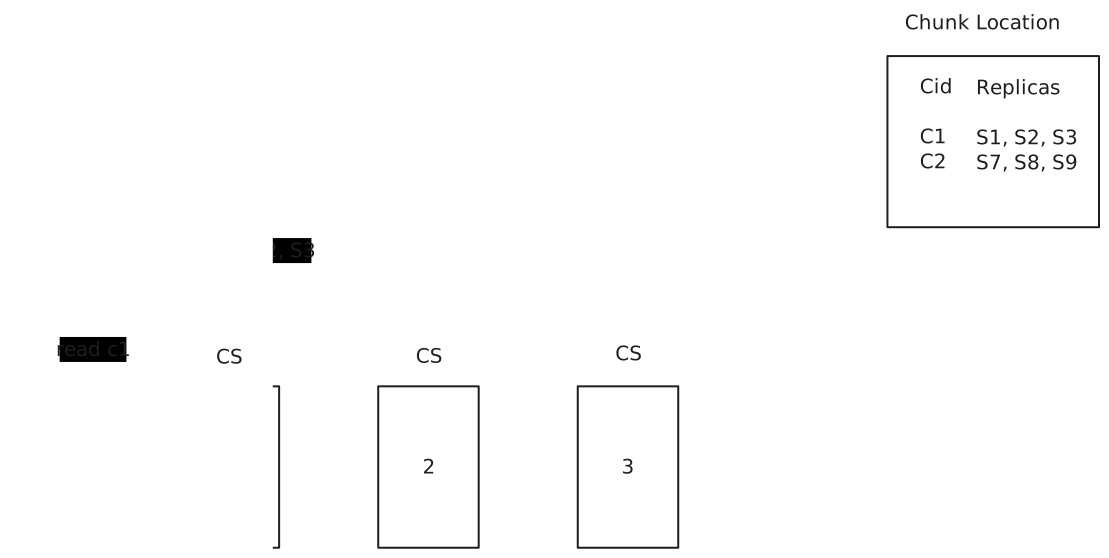
If chunks have the same bytes across chunk servers, the data is consistent. This tell us nothing about the quality of the data, just that it is the same.
Consistent: All clients see the same data regardless of which replica they access.
Defined: Consistent and clients see mutations in their entirety (good data).
| Write | Record Append | |
|---|---|---|
| Serial success | Defined | Defined interspersed with inconsistent |
| Concurrent success | Consistent but undefined (writes may have corrupted each other) | Defined interspersed with inconsistent |
| Failure | Inconsistent | Inconsistent |
Write operation
Serialization: Generate an order for all updates to a file.
Master: Gives a lease for one of the replicas to be the primary replica for a chunk.
Phase I: Metadata query - client query the master for the primary replica.
Phase II: Data transfer - client sends the data to all chunk servers.
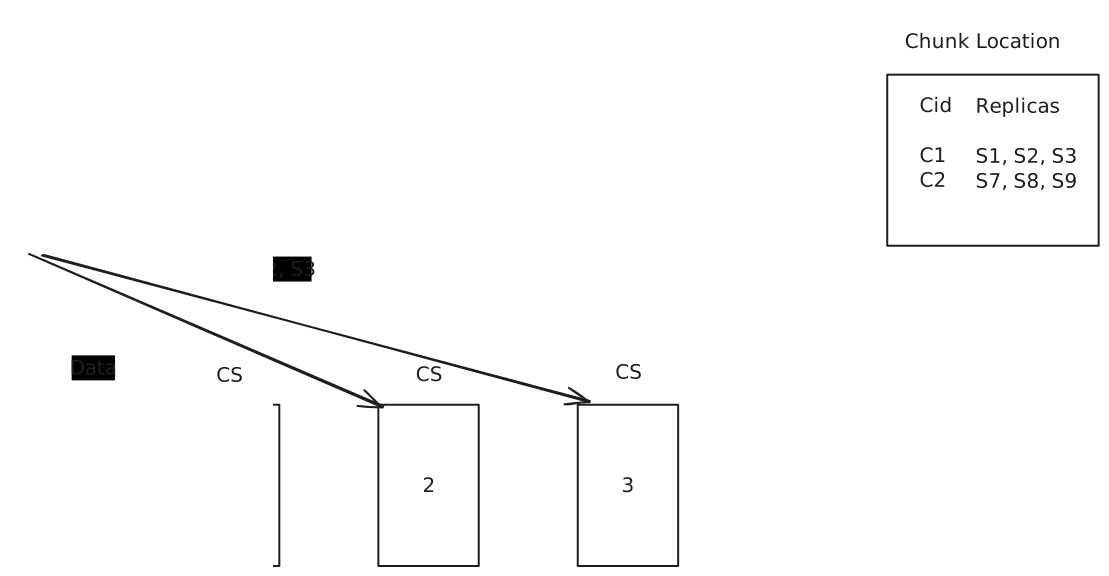
This is parallel data transfer, not a good idea.
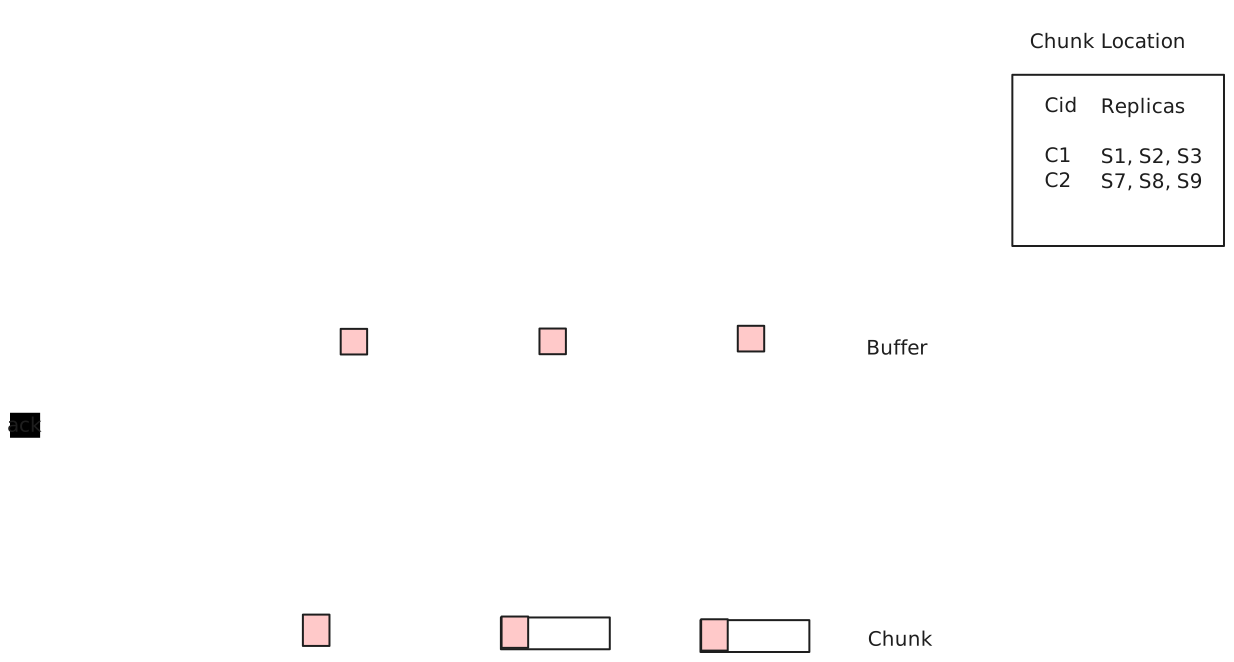
This is an example of Serial Success | Write
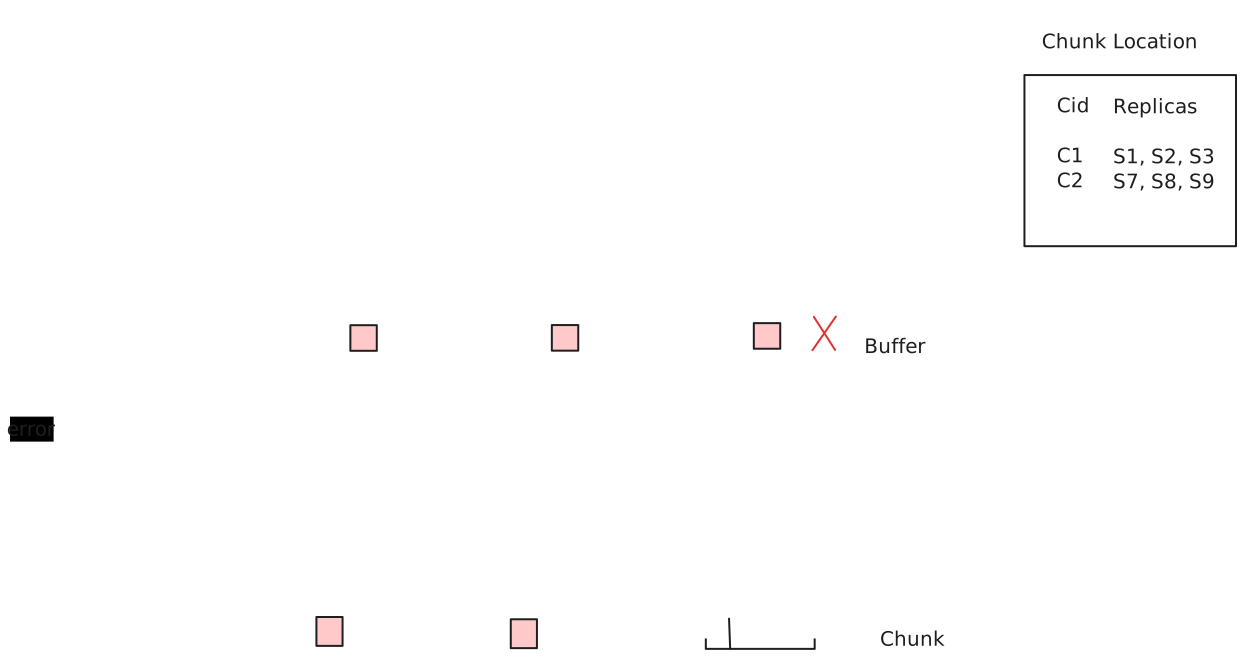
This is Failure | Write
This is Concurrent Successes | Write
We want all of the primaries to agree on an order. We can use 2PC over Raft (within partitions and across partitions), to ensure primaries communicate. Can also use Raft over Raft. In practice they don’t use Raft over Raft, too much latency.
The first attempt to commit from buffer fails on CS 3. Sends back an error and we try again. This time the offset has moved, now appending to slot 120. This is an example of record append being defined interspersed with inconsistent.
At the end of our write, write a checksum. Checksum can tell us of the smiley-face problem prior.
We can add sequence numbers to prevent duplicate writes.